Getting Last Accessed user for a SharePoint Site

Assume that you would like to get last accessed users for a specific site or web in SharePoint. The correct approch is creating a custom IIS Module to get update statistics by every request. If you dont want to do that there you may alternatively use following method.

But we have some conditions:
1) Usage and Health Data Collection Service Application is running.
2) And Microsoft SharePoint Foundation Usage Data Import job running in a small interval (one hour maybe). (Because the data first stores in a Usage file in file System and when the timer job has been executed that data transfered to you Logging Database) Thats mean it is not real time. (If you would like a statistics in real time i suggest that use a custom IIS module)

Than you can search the last 5 accessed user from SQL Server Management Studio by quering Logging Database Server (It would be delayed by interval of Import Timer Job)

Declare @serUrl as nvarchar(MAX), @sitUrl as nvarchar(MAX) , @wUrl as nvarchar(MAX)
Declare webcursor CURSOR FOR select serverurl,siteurl,weburl from RequestUsage group by ServerUrl,SiteUrl,WebUrl
Open webcursor

FETCH NEXT FROM webcursor INTO @serUrl,@sitUrl,@wUrl
WHILE @@FETCH_STATUS = 0 
BEGIN
PRint 'ServerUrl: ' + @serUrl + ' Site Url:' + @sitUrl +  ' Web Url:' + @wUrl
select Top 5 LogTime, UserLogin,ServerUrl,SiteUrl,WebUrl from RequestUsage 
where ServerUrl = @serUrl and SiteUrl = @sitUrl and WebUrl =  @wUrl
--Dont Forget to Exclude SharePoint\system , Central Administration Web Site, Crawler Account, And Timer Service Account for correct results.
and ServerUrl <> 'http://contoso.com:32843'  and UserLogin <> 'SHAREPOINT\system' and UserLogin<> 'Contoso\Crawler'
order by LogTime desc 
FETCH NEXT FROM webcursor INTO @serUrl,@sitUrl,@wUrl
END
CLOSE webcursor
DEALLOCATE webcursor

Stop SharePoint Completely or stopping the farm

For Wss 3.0:

Stop the farm by following these steps:

1. in the Services snap-in, stop the following services:

  • Windows SharePoint Services Administration service
  • Windows SharePoint Services Search service
  • Windows SharePoint Services Timer service
  • Windows SharePoint Services Tracing service
  • Windows SharePoint Services VSS Writer service

2.    at the command prompt, type iisreset /stop.

Do it for all SharePoint installed servers in your farm.
http://technet.microsoft.com/en-us/library/cc512723(v=office.12).aspx

For Moss 2007

Stop the farm by following these steps:

1.  in the Services snap-in, stop the following services:

  • Microsoft Single Sign-On service
  • Office Document Conversions Launcher service
  • Office Document Conversions Load Balancer service
  • Office SharePoint Server Search service
  • Windows SharePoint Services Administration service
  • Windows SharePoint Services Search service
  • Windows SharePoint Services Timer service
  • Windows SharePoint Services Tracing service
  • Windows SharePoint Services VSS Writer service

2. On the server that is running the Central Administration Web site, at the command prompt, type iisreset /stop.
Do it for all SharePoint installed servers in your farm.
http://technet.microsoft.com/en-us/library/cc512725(v=office.12).aspx

For SharePoint Foundation 2010

1. in the Services snap-in, stop the following services:

  • SharePoint 2010 Administration
  • SharePoint 2010 Timer
  • SharePoint 2010 Tracing
  • SharePoint 2010 User Code Host
  • SharePoint 2010 VSS Writer
  • SharePoint Foundation Search V4
  • SharePoint Server Search v4
  • World Wide Web Publishing Service

2. at the command prompt, type iisreset /stop.
Do it for all SharePoint installed servers in your farm.
http://technet.microsoft.com/en-us/library/cc512723(v=office.14).aspx

For SharePoint Server 2010

1.  in the Services snap-in, stop the following services:

  • SharePoint 2010 Administration
  • SharePoint 2010 Timer
  • SharePoint 2010 Tracing
  • SharePoint 2010 User Code Host
  • SharePoint 2010 VSS Writer
  • SharePoint Foundation Search V4
  • World Wide Web Publishing Service
  • SharePoint Server Search 14
  • Web Analytics Data Processing Service
  • Web Analytics Web Service

Not:  The final two services are part of the Web Analytics service application. If you are running the Web Analytics service application and choose to rename your server, you must also reconfigure the Web Analytics database locations. For details, see To reconfigure Web Analytics database locations .

2. On the server at the command prompt, type iisreset /stop.
Do it for all SharePoint installed servers in your farm.
http://technet.microsoft.com/en-us/library/cc512725(v=office.14).aspx

For SharePoint 2013

1. in the Services snap-in, stop the following services:

  • SharePoint 2013 Administration
  • SharePoint 2013 Timer
  • SharePoint 2013 Tracing
  • SharePoint 2013 User Code Host
  • SharePoint 2013 VSS Writer
  • World Wide Web Publishing Service
  • SharePoint Server Search

2. On the server that is running the SharePoint Central Administration website, at a command prompt, type iisreset /stop.
Do it for all SharePoint installed servers in your farm
http://technet.microsoft.com/en-us/library/cc512725(v=office.15).aspx

SharePoint Word Count with Rich Text Editor

This could only be achieved via custom development and is not possible by using SharePoint’s out
of the box features or setup options  this following blog where a word count is achieved with JavaScript:
https://www.nothingbutsharepoint.com/sites/eusp/Pages/add-character-or-word-count-to-sharepoint-multi-line-plain-text-field-and-restrict-input-length.aspx

But there is also an exception , it is only working for a Input element.

Rich Text Box are different than normal text box

<TD vAlign=top width=190 noWrap>
<H3><NOBR>RichText</NOBR> </H3></TD>
<TD vAlign=top RteRedirect=”[Control Chain]_TextField_inplacerte”><!– FieldName=”RichText”
FieldInternalName=”RichText”
FieldType=”SPFieldNote”
–><SPAN>
<DIV>
<DIV style=”DISPLAY: none” id=[Control Chain]_TextField_inplacerte_label>Rich text editor</DIV>
<DIV aria-haspopup=true style=”MIN-HEIGHT: 84px” id=[Control Chain]_TextField_inplacerte role=textbox aria-labelledby=[Control Chain]_TextField_inplacerte_label contentEditable=true InputFieldId=”[Control Chain]_TextField_spSave” UseInlineStyle=”True” aria-autocomplete=”both” aria-multiline=”true”>
<P>​</P></DIV>
<DIV style=”CLEAR: both”></DIV></DIV>
<SPAN dir=ltr><INPUT id= [Control Chain]_TextField_spSave name=[Control Chain]TextField_spSave type=hidden> </SPAN></SPAN></TD>

Text Area :
<TR><TD vAlign=top width=190 noWrap>
<H3><NOBR>RichText</NOBR> </H3></TD>
<TD vAlign=top><!– FieldName=”RichText”
FieldInternalName=”RichText”
FieldType=”SPFieldNote”
<SPAN><TEXTAREA id=”[Control_Chain]_TextField title=RichText cols=20 rows=6 name=””></TEXTAREA>
<BR></SPAN></TD></TR>

SharePoint 2010 has using also div based RTE so javascript codes based on above artilce can be adjust like that;

<script src="<your jquery path and version>/jquery-1.3.2.min.js" type="text/javascript"></script>
<script type="text/javascript">
$('div[role*="textbox"]').bind('keyup blur',function(e){
 var thisLength = $(this).text().length;
if(true && thisLength>0){
thisLength = $(this).text().split(/[' '|\n]/).length;
}

if(true && 200>0){

if(thisLength>(200-5)){
$("#myCustomCounter_").css({'background-color':'#FF0000','font-weight':'bold','color':'white'});
}else if(thisLength>(200-10)){
$("#myCustomCounter_").css({'background-color':'#FF6600','font-weight':'bold','color':'white'});
}else{
$("#myCustomCounter_").css({'background-color':'transparent','font-weight':'normal','color':'black'});
}

}

if(200>0){
if(true){
while(thisLength>200){
currVal = $(this).text();
$(this).val(currVal.substring(0,currVal.lastIndexOf(' ')));
thisLength--;
}
}else{
if(thisLength>200){
currVal = $(this).text();
$(this).val(currVal.substring(0,200));
}
}
thisLength = (200-thisLength<0)?0:200-thisLength;
}

$("#myCustomCounter_").html("Remaining words asda: "+thisLength);
}).parents('td:first').append("<span id='myCustomCounter_' style='padding:2;'></span>").find('input[name*="TextField_spSave"]');

​</script>

The form cannot be rendered. This may be due to a misconfiguration of the Microsoft SharePoint Server State Service

First check that the state service Application has started and State Service Application Proxy has been assigned to your web Application ;

Open your Central Administration
Go to Application Management
Under Service Applications click Configure service application associations
Click on the Application Service Proxy Group of the WebApplication you’re trying your workflow on
Find State Service Application and make it checked .

If you dont have State Service Application you can create a new one by below;

1. Click and lunch  Start->All Programs -> Microsoft SharePoint 2010 Products->  SharePoint 2010 Management Shell .
2. In Windows PowerShell, type $stateapp= New-SPStateServiceApplication -Name “State Service Application”
3. Create a State Service database and associate it with a service application, by typing New-SPStateServiceDatabase -Name “StateServiceDatabase” -ServiceApplication $stateapp
4. Create a State Service Application Proxy and associate it with the service application by typing New-SPStateServiceApplicationProxy -Name “State Service Application Proxy” -ServiceApplication $stateapp -DefaultProxyGroup

http://technet.microsoft.com/en-us/library/ee704548(v=office.14).aspx


SharePoint Pages are not loaded correctly behind Load Balancer.

Assume following scenario ;
You have a custom 3rd party load balancer and you would like to publish only a Subsite of a site collection in SharePoint 2010 through NLB. This scenario is one of specific one , and usually is not supported all load balancers.
Some of 3rd party load balancer can be configure with rules for extra redirections.

In Our Scenario we have
One 3rd party network load balancer (NLB) which is also supporting SSL termination.
And we have a SharePoint farm which is publishing following site
http://blog.bugrapostaci.com -> is our root site collection and we don’t want to redirect through load balancer,
There should be many reasons you don’t want to publish root site directly; security concern, or already referencing another site etc.
https://blog.bugrapostaci.com/Information -> this is our subsite that we want to request through NLB . We are assuming that this site is not contains any customization and pure Sharepoin Team site template.
(Because some customized sites can be requesting extra Web Services or URLs to configure)

First you need to configure your load balancer with SSL termination and installing correct certificate which is out of scope for this article then on SharePoint you need to configure Alternate Access Mapping correctly supporting HTTPS termination.

A sample of correct configuration like this;

Internal URL                                    Zone      Public URL
https://blog.bugrapostaci.com  internet https://blog.bugrapostaci.com
http://blog.bugrapostaci.com     internet https://blog.bugrapostaci.com

Than you need to add rules for NLB for redirecting requests to correct server by HTTPS protocol and any URL contains subsite string of “Information” (our subsite part) . For configuration and how to adding rules to NLB you may need to contact with NLB vendor or check for the usage Manuel.

But this rules are not enough; if you check the site you can detect that page is not working correctly. Why ? Because when you make a request a page it has need to make extra sub requests
You can detect which requests are done at background using Fiddler2 or using F12 Developer tool for IE or Firebug extension of Firefox browser.

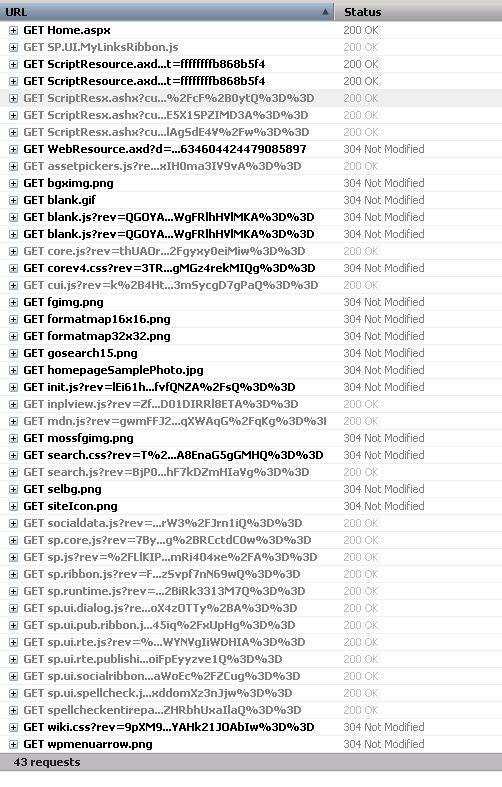
Here you can see a sample request when I browse the page of https://blog.bugrapostaci.com/Information site

requests

In you can see details; there are 43 requests more.


/Information/SitePages/Home.aspx        38,838  private, max-
/ScriptResource.axd?d=3deuDBoJpstM_vnvogSCBV0kbvg4UPvUtpa
/ScriptResource.axd?d=A9qblnwldHbcO4ZGhCK8Ss2nKdc2cWEIJ75
/WebResource.axd?d=Q1l5fspXysTdsR10hp_rImYHRKCODxQ3Hk5D7d
/_layouts/1033/init.js?rev=lEi61hsCxcBAfvfQNZA%2FsQ%3D%3D
/_layouts/1033/styles/Themable/corev4.css?rev=3TRomkG1g2g
/_layouts/1033/styles/Themable/search.css?rev=T%2Bhraxktc
/_layouts/1033/styles/Themable/wiki.css?rev=9pXM9jgtUVYAH
/_layouts/blank.js?rev=QGOYAJlouiWgFRlhHVlMKA%3D%3D
/_layouts/images/bgximg.png
/_layouts/images/blank.gif

And some of the is directly coming from root site. That’s mean just adding a rule for redirecting only subsite string of “Information” is not enough.Here is a sample list for possible requests coming form when you make a request to Subsite. You should add necessary rules for this requests.

“/Information” -> the subsite url part.
“/_controltemplates”
“/_layouts”  -> Images ,Styles, Javascripts
“/_vti_bin”
“/_wpresouces”
“/App_Browsers”
“/App_GlobalResources”
“/wpresouces”
“/_app_bin”
“/_vti_pvt”
“/_forms”
“/_login”
“/_windows”
“/ScriptResource.axd” -> Handlers
“/WebResource.axd”  -> Handlers.

this sample is only valid for pure SharePoint Team Site Template without customization ; So if you have some customizations and extra webservices requests or using another paths .
I could not you tell extra url names but I can show you how could you catch a fish

You can test with;

Getting a Fiddler,Developer Tool for IE or Firebug extension for Firebug trace on Server without https and make request to your Subsite . You can see all needed requests and files need to be loaded for working this page is correctly. Make a list for it;
Do it same operation behind Load Balancer and test , add missing redirections to 3rd party load balancer rules for them.