how to remove unnecessery handler mappings from Sharepoint 2010 web application for security purpose

This article explains how to restrict or remove unnecessary handler mappings for  Microsoft SharePoint Foundation web application in the Integrated Request Pipeline of Internet Information Services (IIS) .

As you know Sharepoint has modifed the pipeline for more information about Why Sharepoint modifing the request pipeline please read this topic :
http://msdn.microsoft.com/en-us/library/ee537834.aspx

For a general web application you can modify pipleline using:

  • Pipeline Changes at the ASP.NET Framework Level: Sharepoint  does not change any thing for this level that mean sharepoint makes no changes to the machine.config file or the global web.config file.
  • Pipeline Changes at the IIS Configuration Level : The modifications on applicationhost.config file.This file is located in the %WinDir%\System32\inetsrv\config\ directory and it contains registrations of the IIS Web sites and application pools on the server, as well as some settings that apply to all Web applications on the Web server. The settings in applicationhost.config are primarily oriented to the parts of the pipeline that are contributed by IIS, whereas the machine.config and the global web.config files contain settings that are primarily oriented to the parts of the integrated request pipeline that are contributed by ASP.NET.
  • Pipeline Changes at the SharePoint Web Application Level: The modifications on web.config files.
  • Pipeline Changes at the Directory Level : The modifications on directory levels still using web.config files.Particular physical or virtual directories in an IIS Web site can also have their own web.config file to add new settings or override inherited settings. The new settings and overrides, of course, apply only to HTTP requests for resources located within the directory and its subdirectories.

Important ! :In this article scope of “Pipeline Changes at the IIS Configuration Level” so get backup your applicationhost.config file before do anything in %WinDir%\System32\inetsrv\config\

Bellowed configuration is for standart sharepoint web application so if you have some custom codes that need extra handler please add needed handlers to list.

For removing handler mappings

1) open your IIS console.
2) select your Sharepoint Web Application
3) Click Handler Mappings.

And Remove unneceserry handler mappings by selecting and clicking remove button on iis console.

 The handlers in  picture below are the needed ones so don’t delete them.

So sharepoint is not use any .net framework 4.0 components and the other iis default isapi extentions.
Always make a test that your site is working correctly. For testing use these starting points:

  • Test Pages
  • Test System Pages
  • Test File Upload
  • Test Search
  • Test Sharepoint Designer Connection
  • Add your custom test items.

see you next articles.

Attach custom master page to personal site using Stapling feature for Sharepoint 2010

Hi Everyone ,

In this article i am explaining how could we attach a custom master page to  Personal sites in MySite Host. I have created two Sharepoint Project named MyMasters and MyMastersStapling using Visual Studio 2010.

you can download the visual studio solution from CodePlex
http://mymasters.codeplex.com/

The solution is anwering fallowing questions  :

* How to deploy custom master page ?
* How to customize a masterpage ?
* How to attach custom master page to personal sites using staping feature ?
* How to set wellcome page programmatically ?
* How to add document library as a web part to a page ?


MyMasters  Project
: is a sharepoint project that deploy a custom master page to a sharepoint site.
MyMasterStapling  Project: is a sharepoint project that attach feature of MyMasters to personal site template and activates the publishing features
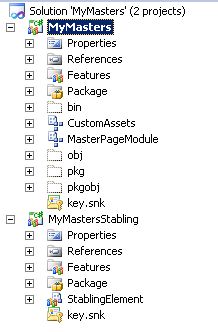
First i created a site scope feature named “MyMasters”  and and a feaurereciever .The important part is here the feature guid . You need this guid for feature stapling configuration. you can get the feature guid from Feature manifest file.

<Feature xmlns=”http://schemas.microsoft.com/sharepoint/” Title=”MyMasters” Description=”This feature enables defined master page for your site”
Id=”09c222f7-68ed-4278-a3ce-d64b8dbfb168” ReceiverAssembly=”MyMasters, Version=1.0.0.0, Culture=neutral, PublicKeyToken=2e49c3c1155d0e27″ ReceiverClass=”MyMasters.Features.MyMasters.MyMastersEventReceiver” Scope=”Site”>
… child nodes
</Feature>

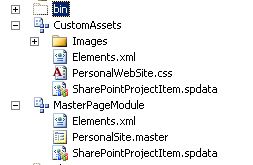
And I have create two modules MasterPageModule and CustomAssests Module .

MasterPageModule : contains masterpage file and when the feature is activated it deploy master page the masterpage library under _catalogs folder.
CustomAssests : contains necessary css , js and image files. when the feature is activated it deploy assests to Style Library List of target site by creating specific folder for each asset type.
Here is the code of Feature Reciever.

public class MyMastersEventReceiver : SPFeatureReceiver
{
// Uncomment the method below to handle the event raised after a feature has been activated.
public override void FeatureActivated(SPFeatureReceiverProperties properties)
{
ApplyTheme(properties);
}
// Uncomment the method below to handle the event raised before a feature is deactivated.
public override void FeatureDeactivating(SPFeatureReceiverProperties properties)
{
RevertTheme(properties);
SPSite site = (SPSite)properties.Feature.Parent;
if (site != null)
{
//Remove custom master page
SPFile masterFile = site.RootWeb.GetFile(“_catalogs/masterpage/PersonalSite.master”);
masterFile.Delete();
//Remove assets folders.
site.RootWeb.Folders[“Style Library”].SubFolders.Delete(“CustomCssFiles”);
site.RootWeb.Folders[“Style Library”].SubFolders.Delete(“CustomJSFiles”);
site.RootWeb.Folders[“Style Library”].SubFolders.Delete(“CustomImages”);
}
}   private void ApplyTheme(SPFeatureReceiverProperties properties)
{
SPSite site = (SPSite)properties.Feature.Parent;
if (site != null)
{
// Set the System Master Page to orginal
Uri masterUri = new Uri(site.RootWeb.Url + “/_catalogs/masterpage/v4.master”);
site.RootWeb.MasterUrl = masterUri.AbsolutePath;
// Set the Publishing Master Page our custom PersonalSite.master page.
Uri customMasterUri = new Uri(site.RootWeb.Url + “/_catalogs/masterpage/PersonalSite.master”);
site.RootWeb.CustomMasterUrl = customMasterUri.AbsolutePath;
site.RootWeb.Update();
}
}
private void RevertTheme(SPFeatureReceiverProperties properties)
{
SPSite site = (SPSite)properties.Feature.Parent;
if (site != null)
{
// Set the System Master Page to orginal
Uri masterUri = new Uri(site.RootWeb.Url + “/_catalogs/masterpage/v4.master”);
site.RootWeb.MasterUrl = masterUri.AbsolutePath;
// Set the Publishing Master Page  to orginal
Uri customMasterUri = new Uri(site.RootWeb.Url + “/_catalogs/masterpage/v4.master”);
site.RootWeb.CustomMasterUrl = customMasterUri.AbsolutePath;
site.RootWeb.Update();
}
}
}

By default the following rule applies when you deploy a master page:

  • Site Master Pages: used by all publishing pages – and only by publishing pages
  • System Master Pages: used by everything else including forms and view pages

So in Feature reciever ->  ApplyTheme() function we set two master page first one is V4.master the orginal master for System masterpage and our custom master for Site Master page. As you know you have to enable Publishing Features for  the site if you want to this deplotment work correctly.
For deploying PersonalSite.master via module the element file :

<?xmlversion=1.0encoding=utf-8?>
<Elementsxmlns=http://schemas.microsoft.com/sharepoint/>
<ModuleName=MasterPageModuleList=116Url=_catalogs/masterpage>
   <FilePath=MasterPageModule\PersonalSite.master  Url=PersonalSite.masterType=GhostableInLibrary >
        <PropertyName=UIVersionValue=4 />
        <PropertyName=ContentTypeIdValue=0x010105 />
   </File>
</Module>
</Elements>

You can deploy this solution any site by using visual studio at the end you can able to see this view :

For MyMasterStapling Project . I have created a farm level feature named “MyMastersStapling” and an empty element named “StaplingElement”
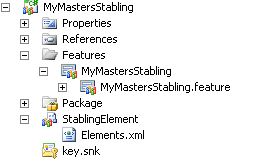

Element.xml :

<?xmlversion=1.0encoding=utf-8?>
<Elementsxmlns=http://schemas.microsoft.com/sharepoint/>
<FeatureSiteTemplateAssociationId=f6924d36-2fa8-4f0b-b16d-06b7250180faTemplateName=SPSPERS#0 />
<FeatureSiteTemplateAssociationId=22a9ef51-737b-4ff2-9346-694633fe4416TemplateName=SPSPERS#0 />
<FeatureSiteTemplateAssociationId=09c222f7-68ed-4278-a3ce-d64b8dbfb168TemplateName=SPSPERS#0 />
</Elements>

The FeatureSiteTemplateAssociation element maps feature GUIDs to site defintions – note that the format of the TemplateName attribute value is <SiteDefName>#<ConfigurationID>. This obviously allows a degree of flexibility and allows you to do fairly complex things with different configurations of site definitions. As you now at the beginning of article we highlighted a GUID the feature of MyMasters.

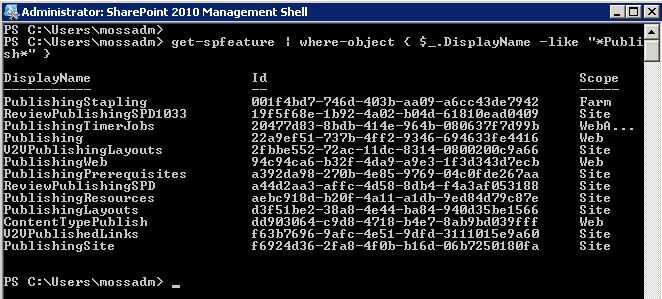
The third item is using this guid 09c222f7-68ed-4278-a3ce-d64b8dbfb168 .What about first two ? these feature ids are blong to Publishing Features. First one is “Publishing Feature Site”  feature’s id at site level and the second one is Publishing feature’s id at web level.

These two ids are built in sharepoint 2010 and it is not change by installation .If you wonder how could i found this ids ,i used the powershell console for sharepoint :
get-spfeature | where-object { $_.DisplayName -like “*Publish*” }
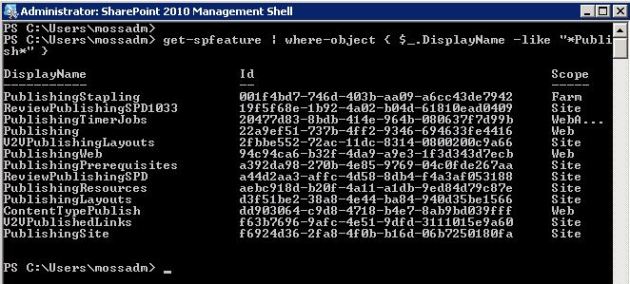

For Template name  SPSPERS is the personal site template name.  for #Zero i am attaching the default configuration.

For More information about site templates.
http://office.microsoft.com/en-us/sharepoint-server-help/a-preview-of-the-sharepoint-server-2010-site-templates-HA101907564.aspx

So far so good. After you deploy our stapling project and activate the feature , the users can able to see our custom master page even if self site creation is enabled for personal sites .

See you next articles.

Unable to complete upgrate after installing Aug 2011 Cu for Sharepoint 2010 and getting error of Exception: localStoragePath

Every upgrade attemp is one of challage for IT team. So this time we are working on a problem which is occured after Aug 2011 Cumulative Update.
the symptom is Sharepoint Configuration Wizard can not able to complete and finishing with failure.

First of all once we check the PSCDiagnostics logs we could not able to find something useful:

Configuration of SharePoint Products failed.  Configuration must be performed in order for this product to operate properly.  To diagnose the problem, review the extended error information located at C:\Program Files\Common Files\Microsoft Shared\Web Server Extensions\14\LOGS\PSCDiagnostics_10_7_2011_9_55_26_860_989474110.log, fix the problem, and run this configuration wizard again

Cool but it say nothing. So we peek that let check “upgrade” logs …
And see some error. LocalStoragePath. What is actually LocalStoragePath and why we are getting this error while upgrading. It is definitly something wrong with search db.

[OWSTIMER] [SPUpgradeSession] [ERROR] [10/7/2011 10:05:49 AM]: Exception: localStoragePath
[OWSTIMER] [SPUpgradeSession] [INFO] [10/7/2011 10:05:49 AM]: SearchAdminDatabase Name=Fast_Query_SSA_DB_3a64d349dc2249679a8be
[OWSTIMER] [SPUpgradeSession] [ERROR] [10/7/2011 10:05:49 AM]:    at Microsoft.Office.Server.Search.Administration.SearchApi.AssertParameter(String parameterName, Boolean condition)
   at Microsoft.Office.Server.Search.Administration.SearchApi.UpdateAdminComponent(String serverName, Guid serverId, String localStoragePath, Boolean standalone, Nullable`1 settingsInRegistry)
   at Microsoft.Office.Server.Search.Upgrade.SearchAdminDatabaseSequence.InitializeTopologyBasedOn2007Settings()
   at Microsoft.Office.Server.Search.Upgrade.SearchAdminDatabaseSequence.PostUpgrade()
   at Microsoft.SharePoint.Upgrade.SPUpgradeSession.Upgrade(Object o, Boolean bRecurse)

The problem in our scenario is some how psconfig can not update the topology, possible cause for this may be service name changes may be an old conf. backup restored or even more the server name has changed.  

Resolution

1. Checked the Upgrade error log and notice following information
[OWSTIMER] [SPUpgradeSession] [INFO] [10/7/2011 10:05:49 AM]: SearchAdminDatabase Name=Fast_Query_SSA_DB_3a64d349dc2249679a8be…

2.Use Get-SPEnterpriseSearchServiceApplication cmdlet and list all search service applications. we try to delete the Search Service Application. Unable to delete the service Application through GUI hence tried successfully with following Powershell command.

$ssa = Get-SPEnterpriseSearchServiceApplication -Identity 4e6d0c5c-f47b-425e-a637-e8a44aca12ae
$ssa.Delete()  

We had 2 search application more so we deleted all of them .

3. Run the configuration wizard

4. created a new SSA to after configuration wizard has run.

Create all users’ personal site via Powershell script – Sharepoint 2010

#PowerShell Script - Create All Users Personel Sites - SharePoint 2010 #The scripts is distributet "as-is." Use it on your own risk. 
#Add SharePoint PowerShell SnapIn if not already added if ((Get-PSSnapin "Microsoft.SharePoint.PowerShell" -ErrorAction SilentlyContinue) -eq $null) {
    Add-PSSnapin "Microsoft.SharePoint.PowerShell"
}

[Reflection.Assembly]::LoadWithPartialName("Microsoft.Office.Server")

$mysiteHostUrl = "http://my"
$personalSiteGlobalAdmin = "DOMAIN\padm"
$personalSiteGlobalAdminNot ="padm@bugrapostaci.com"
$personalSiteGlobalAdminDisplayName = "Personel Site admin"
$mysite = Get-SPSite $mysiteHostUrl

$context = [Microsoft.Office.Server.ServerContext]::GetContext($mysite)
$upm =  New-Object Microsoft.Office.Server.UserProfiles.UserProfileManager($context)

$AllProfiles = $upm.GetEnumerator()

foreach($profile in $AllProfiles)
{

    $DisplayName = $profile.DisplayName
    $AccountName = $profile[[Microsoft.Office.Server.UserProfiles.PropertyConstants]::AccountName].Value
       #Add your restrictions for users.        if($Accountname -like "YourDomain*")
       {
          if($profile.PersonalSite -eq $Null)
          {
               write-host "Creating personel site for ", $AccountName
               $profile.CreatePersonalSite()
               #Adding an extra admin for personel sites                $pweb = $profile.PersonalSite.OpenWeb()
               $pweb.AllUsers.Add($personalSiteGlobalAdmin,$personalSiteGlobalAdminNot,$personalSiteGlobalAdminDisplayName,$null);
               $padm= $pweb.AllUsers[$personalSiteGlobalAdmin];
               $padm.IsSiteAdmin = $true;
               $padm.Update();
               $pweb.Dispose();
               write-host "Personal Site Admin has assigned"
          }
          else
          {
               write-host $AccountName ," has already personel site"
          }
   }
}
$mysite.Dispose();

Sharepoint 2010 – Delete all users’ personel sites via powershell

#PowerShell Script - Delete All Users Personel Sites - SharePoint 2010
#The scripts is distributet "as-is." Use it on your own risk. The author give no warranties, guarantees or conditions.

#Add SharePoint PowerShell SnapIn if not already added
 if ((Get-PSSnapin "Microsoft.SharePoint.PowerShell" -ErrorAction SilentlyContinue) -eq $null) {
    Add-PSSnapin "Microsoft.SharePoint.PowerShell"
}
[Reflection.Assembly]::LoadWithPartialName("Microsoft.Office.Server")

$mysiteHostUrl = "http://my"
$mysite = Get-SPSite $mysiteHostUrl
$context = [Microsoft.Office.Server.ServerContext]::GetContext($mysite)

$upm =  New-Object Microsoft.Office.Server.UserProfiles.UserProfileManager($context)

$AllProfiles = $upm.GetEnumerator()

foreach($profile in $AllProfiles)
{
   $DisplayName = $profile.DisplayName
   $AccountName = $profile[[Microsoft.Office.Server.UserProfiles.PropertyConstants]::AccountName].Value  

   if($profile.PersonalSite -ne $Null)
   {

	   $profile.PersonalSite.Delete()
	   write-host $AccountName , " personel site deleted successfully"
   }
}
$mysite.Dispose();