SharePoint 2010 SP2 has been released

Please be aware that SP2 is now available for Office 2010 and SharePoint 2010 as well as the other server products.

The SP2 release improves the compatibility of the Office and SharePoint 2010 products with Windows 8, Internet Explorer 10, Office 2013, and SharePoint 2013. It also addresses security, stability, and performance and contains all the Cumulative Updates (CU)and Public Updates (PU) that have released since SP1, starting with the June 2011 CU and July 2011 PU and ending with the April 2013 CU and May 2013 PU.

SharePoint Server 2010 SP2
http://support.microsoft.com/kb/2687453
SharePoint Foundation 2010 SP2
http://support.microsoft.com/kb/2687464

*Unlikely the previous SP1 , if you have SharePoint Server 2010 installation you don’t need to install SharePoint Foundation 2010 SP2 first, SharePoint Server SP2 already contains this update.

Server Language Pack SP2
http://support.microsoft.com/kb/2687462
SharePoint Foundation 2010 Language Pack SP2
http://support.microsoft.com/kb/2687466

Project Server 2010 SP2
http://support.microsoft.com/kb/2687452
Search Server 2010 SP2
http://support.microsoft.com/kb/2687461
SharePoint Designer 2010 SP2
http://support.microsoft.com/kb/2687463

* It is recommended to install June 2013 CU before SP2. June 2013 CU might not correctly identify the SP2 baseline. If SP2 has already been installed and June CU does not install you need to wait for August CU which will correctly identify the SP2 baseline.

* our Service Packs are cumulative. You can install SP2 directly on RTM.

Here you can find some changes with SharePoint SP2

  • Navigating to a SharePoint site with a BlackBerry device may open a non-mobile page.   Adding RIM6 into compat.browser allows users to access SharePoint pages and view documents in mobile view.
  • If anonymous access is enabled for Sharepoint 2010 SP1 (or later Cumulative Update), attempts to to access the site via a mobile device will receive an authentication prompt.
  • Customers are unable to use spell check in Korean when running SharePoint on Windows Server 2012.
  • Displaying Summary Links Web Part in personalizing view; generating confusing error message.
  • Deployment fails for content types containing a formula field in Italian.
  • File attachments are not deleted due to incorrect URL formatting
  • If requireExactUrl is not set for openweb calls, the PublishingWeb constructor may spawn variation pages  into incorrect locations while attempting re-creation of failed label during create hierarchies.
  • Incremental content deployment fails, giving the following error: FatalError: The given key was not present in the dictionary
  • Spell Checker doesn’t work properly with Internet Explorer 10.
  • Rich text editor spell checker may work incorrectly on 64 bit machines.
  • Customers encounter issues sending e-mail from workflows when the From address uses a non-Unicode character set.
  • Updated VBE7.dll to fix safe array corruption for x64 hosts when calling UDF methods using safe array arguments directly from the host.
  • SQL exceptions will appear in the log when running update statistics timer.
  • Improved performance of the AllUserData table.
  • Getting a feed against a discussion board fails if feed contains more than zero items.
  • SharePoint 2010 client object model now has compatibility for accessing Sharepoint 2013 servers.
  • Windows 8 users with Internet Explorer 10 receive an error when trying to open a document from SharePoint 2010 directly in the Office client.
  • Call GetChanges won’t return changes in certain cases where the change log has been edited and no parameters are set.
  • STSAdm MigrateUser fails when SQL server is not in domain.
  • Attempting to delete a child web from site settings causes the page to fail.
  • There is no exposed method to recalculate the second stage recycle bin size.
  • April 2011 Calendar View does not display correctly with Amman System Time zone
  • Users can create a scenario where a site loses permissions.
  • After deleting a web that contains historical document versions in the RecycleBin, rows are abandoned in the database.  These rows bloat the size of the database, causing difficulty with database management operations such as backup/restore, complicating upgrade and other scenarios.
  • After creating alerts on a document library with unique permissions and moving the contents using SPFolder.MoveTo method, the permissions seem to be lost and even the farm administrator is not able to delete these alerts.

More Resources:
http://blogs.technet.com/b/office_sustained_engineering/

http://blogs.office.com/b/sharepoint/archive/2013/07/23/check-out-the-sharepoint-server-2010-service-pack-2.aspx

Note: Due to required changes to the Prerequisite Installer, Service Pack 2 cannot be slipstreamed into installation media for use with installation on Windows Server 2012 systems.  Installation of SharePoint Server 2010 with Service Pack 2 on Windows Server 2012 systems requires an integrated Service Pack 2 installation media due
following the patch release.
Configuration Wizard fails with a url may only map to one zone at a time

When you run configuration wizard if it has failing with following error;

Exception: System.ArgumentException: The IncomingUrl is already present in the collection in a different zone.  A url may only map to one zone at a time.  Use a different url for requests from this zone.
at Microsoft.SharePoint.Administration.SPAlternateUrlCollection.Add(SPAlternateUrl alternateUrl, Boolean fUpdate, Boolean throwIfExists)
at Microsoft.SharePoint.Administration.SPAdministrationWebApplication.Provision()
at Microsoft.SharePoint.Administration.SPWebServiceInstance.Provision()
at Microsoft.SharePoint.PostSetupConfiguration.CentralAdministrationSiteTask.ProvisionAdminVs()
at Microsoft.SharePoint.PostSetupConfiguration.CentralAdministrationSiteTask.Run()
at Microsoft.SharePoint.PostSetupConfiguration.TaskThread.ExecuteTask()

1) Check for all alternate Access mappings for any doublicate value present in AAM.

2)Check IIS Bindings for web applications and extended sites have any doublicate url issues.

3) If the problem happening on Central Administration site. Go to AAM settings and temporary clear other zone urls and run configuration wizard again.


June 2013 CU for SharePoint 2010 has been re-released

“The product group has now re-released the June 2013 Cumulative Update for the affected products including SharePoint.Be aware that the KB article numbers of the re-released Fixes are different from the original ones.The KB articles are not yet available but should be in the next couple of days. The fixes can already be downloaded. It is strongly recommended that customers who installed the initial June CU install the re-released updates.”

http://blogs.technet.com/b/stefan_gossner/archive/2013/07/11/june-2013-cu-for-sharepoint-2010-has-been-re-released.aspx

http://blogs.msdn.com/b/joerg_sinemus/archive/2013/07/11/update-sharepoint-2010-and-june-2013-cu.aspx

How to get domain\user notation of an account if it is in claim format

You can convert claim format into domain\user format  ;

string Username;
SPClaimProviderManager
mgr = SPClaimProviderManager.Local;
if (mgr != null && SPClaimProviderManager.IsEncodedClaim(SPContext.Current.Web.CurrentUser.LoginName))
           {
Username= mgr.DecodeClaim(SPContext.Current.Web.CurrentUser.LoginName).Value;
           }
else
          {
Username= SPContext.Current.Web.CurrentUser.LoginName;
}


More details of the SPClaimProviderManager methods:
http://msdn.microsoft.com/en-us/library/microsoft.sharepoint.administration.claims.spclaimprovidermanager_methods.aspx


SharePoint Pages are not loaded correctly behind Load Balancer.

Assume following scenario ;
You have a custom 3rd party load balancer and you would like to publish only a Subsite of a site collection in SharePoint 2010 through NLB. This scenario is one of specific one , and usually is not supported all load balancers.
Some of 3rd party load balancer can be configure with rules for extra redirections.

In Our Scenario we have
One 3rd party network load balancer (NLB) which is also supporting SSL termination.
And we have a SharePoint farm which is publishing following site
http://blog.bugrapostaci.com -> is our root site collection and we don’t want to redirect through load balancer,
There should be many reasons you don’t want to publish root site directly; security concern, or already referencing another site etc.
https://blog.bugrapostaci.com/Information -> this is our subsite that we want to request through NLB . We are assuming that this site is not contains any customization and pure Sharepoin Team site template.
(Because some customized sites can be requesting extra Web Services or URLs to configure)

First you need to configure your load balancer with SSL termination and installing correct certificate which is out of scope for this article then on SharePoint you need to configure Alternate Access Mapping correctly supporting HTTPS termination.

A sample of correct configuration like this;

Internal URL                                    Zone      Public URL
https://blog.bugrapostaci.com  internet https://blog.bugrapostaci.com
http://blog.bugrapostaci.com     internet https://blog.bugrapostaci.com

Than you need to add rules for NLB for redirecting requests to correct server by HTTPS protocol and any URL contains subsite string of “Information” (our subsite part) . For configuration and how to adding rules to NLB you may need to contact with NLB vendor or check for the usage Manuel.

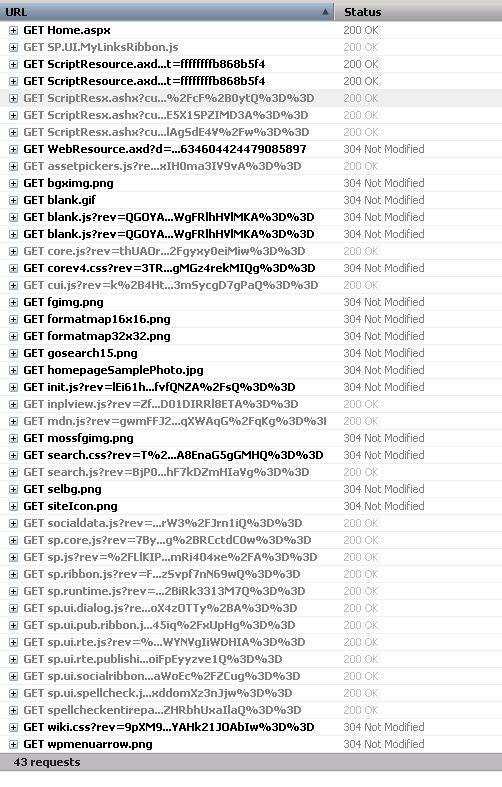
But this rules are not enough; if you check the site you can detect that page is not working correctly. Why ? Because when you make a request a page it has need to make extra sub requests
You can detect which requests are done at background using Fiddler2 or using F12 Developer tool for IE or Firebug extension of Firefox browser.

Here you can see a sample request when I browse the page of https://blog.bugrapostaci.com/Information site

requests

In you can see details; there are 43 requests more.


/Information/SitePages/Home.aspx        38,838  private, max-
/ScriptResource.axd?d=3deuDBoJpstM_vnvogSCBV0kbvg4UPvUtpa
/ScriptResource.axd?d=A9qblnwldHbcO4ZGhCK8Ss2nKdc2cWEIJ75
/WebResource.axd?d=Q1l5fspXysTdsR10hp_rImYHRKCODxQ3Hk5D7d
/_layouts/1033/init.js?rev=lEi61hsCxcBAfvfQNZA%2FsQ%3D%3D
/_layouts/1033/styles/Themable/corev4.css?rev=3TRomkG1g2g
/_layouts/1033/styles/Themable/search.css?rev=T%2Bhraxktc
/_layouts/1033/styles/Themable/wiki.css?rev=9pXM9jgtUVYAH
/_layouts/blank.js?rev=QGOYAJlouiWgFRlhHVlMKA%3D%3D
/_layouts/images/bgximg.png
/_layouts/images/blank.gif

And some of the is directly coming from root site. That’s mean just adding a rule for redirecting only subsite string of “Information” is not enough.Here is a sample list for possible requests coming form when you make a request to Subsite. You should add necessary rules for this requests.

“/Information” -> the subsite url part.
“/_controltemplates”
“/_layouts”  -> Images ,Styles, Javascripts
“/_vti_bin”
“/_wpresouces”
“/App_Browsers”
“/App_GlobalResources”
“/wpresouces”
“/_app_bin”
“/_vti_pvt”
“/_forms”
“/_login”
“/_windows”
“/ScriptResource.axd” -> Handlers
“/WebResource.axd”  -> Handlers.

this sample is only valid for pure SharePoint Team Site Template without customization ; So if you have some customizations and extra webservices requests or using another paths .
I could not you tell extra url names but I can show you how could you catch a fish

You can test with;

Getting a Fiddler,Developer Tool for IE or Firebug extension for Firebug trace on Server without https and make request to your Subsite . You can see all needed requests and files need to be loaded for working this page is correctly. Make a list for it;
Do it same operation behind Load Balancer and test , add missing redirections to 3rd party load balancer rules for them.