Consider fallowing scenario that you have SQL Server 2008 R2 RBS enabled, and SharePoint Server 2010 RBS installed servers . You have some files that stored in SharePoint document library whichs streams are stored in RBS and even you deleted this files form SharePoint Document Library you noticed that the Blob data in file system still remaining.
Usually this is not a problem it is by design issue , because purpose of data recovery ,performance consideration, data integrity and safety the deleted files in real are not deleted immediately. So many systems are designed like this as SharePoint and also RBS included. In that kind of systems as a manner of being on the safe side they are just mark the files are deleted and than runs some background process later for deleting files according when some thresholds or limits are exceeded. If you what to find out this issue is a real problem you have to disable or make shut down this functionalities and after doing this still the blob files are remain on file system then you can say that you have a real problem.
On SharePoint side First thing you should check that the feature of Recycle Bin.
“Recycle Bins are used to help users protect and recover data.Microsoft SharePoint Server 2010 supports two stages of Recycle Bins: the first-stage Recycle Bin and second-stage Recycle Bin.When a user deletes an item, the item is automatically sent to the first-stage Recycle Bin. By default, when an item is deleted from the first-stage Recycle Bin, the item is sent to the second-stage Recycle Bin. A site collection administrator can restore items from the second-stage Recycle Bin.You turn on and configure Recycle Bins at the Web application level. By default, Recycle Bins are turned on in all the site collections in a Web application. This article describes how to configure Recycle Bin settings for a Web application.”
http://technet.microsoft.com/en-us/library/cc263125(v=office.14).aspx
For more information and usage recommendations about SharePoint Server 2010 Recycle Bins, see Plan to protect content by using recycle bins and versioning (SharePoint Server 2010).
In that Point you have two option to bypass this feature that 1) you can totally disable Recycle Bin from Central Administrations site by CA-> Manage Web Application -> Select web Application which you decided to disable Recycle bin feature -> on Ribbon Menu Select General Settings and set “Recycle Bin” property as “Off”
2) or when you delete a file you can clear Site (First-stage) and Site Collection (Second-Stage) Recycle bins.
On SQL side in Content Database if you want to be sure and confirm deletion of the file you can use fallowing SQL .
1) Open SQL Server Management Studio
2) Select related Content Database and click “New Query”
3) Select * from AllDocs where ListID='<GUID>’
*** You can find List Guid on Browser Address bar when you open Library Settings page of a document libarary.
and check results for the file still is exists in that list .If you clear correct there should not be the related file is present on the results.
Even that you confirm that the file has been deleted from Content Database will still the Blob Data remains in File System where the blobs are stored. Becuase there is another mechanizm in SQL RBS side named “RBS Garbage Collector”
“SharePoint Server 2010 automatically marks unreferenced or deleted BLOB data for removal. SharePoint Server 2010 counts references to BLOBs by looking at the list of BLOB IDs stored by SharePoint Server 2010 in its content databases at the time of removal. Any BLOB references that are present in the RBS store tables but absent in the content database are assumed to be deleted by SharePoint Server 2010 and will be marked for removal. BLOBs that are not present in the content database and were created before the orphan cleanup time window, described later in this article, are also assumed to be deleted by SharePoint Server 2010 and will be marked for removal.
Because SharePoint Server 2010 tabulates BLOB references from the RBS columns of the content database, every RBS column must have a valid index before it can be registered in RBS.
The SQL Server RBS Maintainer tool removes the items marked by SharePoint Server 2010 for removal. You should schedule the clean-up tasks to be run during off-peak hours to reduce the effect on regular database operations.
RBS garbage collection is performed in the following three steps:
- Reference scan.(RC) The first step compares the contents of the RBS tables in the SharePoint Server 2010 content database with RBS’s own internal tables and determines which BLOBs are no longer referenced. Any unreferenced BLOBs are marked for deletion.
- Delete propagation. (DP) The next step determines which BLOBs have been marked for deletion for a period of time longer than the garbage_collection_time_window value and deletes them from the BLOB store.
- Orphan cleanup. (OC) The final step determines whether any BLOBs are present in the BLOB store but absent in the RBS tables. These orphaned BLOBs are then deleted”
http://technet.microsoft.com/en-us/library/ff943565(v=office.14).aspx
We have talked about ThreshHolds . In RBS configuration we have 3 important threshold for clearing BLOB data.
delete_scan_period :Specifies the minimum amount of time that must pass between two reference scan garbage collection runs. The default value is 30 days
orphan_scan_period: Specifies the minimum amount of time that must pass between two orphan cleanup garbage collection runs. The default value is 30 days
garbage_collection_time_window : Specifies the minimum time that must pass between identifying a blob as having no references in the database and deleting the blob from the store. This guarantees the availability of BLOBs for the specified time in case a backup is restored. The default value is 30 days.
So according to default values , your BLOB files should be cleared after 30 days , if they are not referenced to any Content Database record.
You can get more information about all configuration thresholds about RBS with following article:
http://msdn.microsoft.com/en-us/library/gg316763(v=sql.105).aspx
For testing immediate delete we can change these threashold .From SQL Server Management Studio:
1)Open SQL Server Management Studio
2)Select RBS enabled Content Database and click “New Query”
3) Execute following queries.
exec mssqlrbs.rbs_sp_set_config_value ‘garbage_collection_time_window’, ‘time 00:00:00’;
exec mssqlrbs.rbs_sp_set_config_value ‘delete_scan_period ‘, ‘time 00:00:00’;
exec mssqlrbs.rbs_sp_set_config_value ‘orphan_scan_period’, ‘time 00:00:00’;
Our job is not done yet:
“The actual work of GC is done by the RBS Maintainer application. The maintainer is a console application that takes command line parameters such as the connection string to the database and the phases of GC to execute. This can be run from any machine that has access to the DB and the blob store(s). It can also be run from multiple machines simultaneously. You can schedule it using your favorite scheduler e.g. Windows Task Scheduler.
Maintainer also takes an optional parameter to limit the amount of time it is run”
http://blogs.msdn.com/b/sqlrbs/archive/2008/08/08/rbs-garbage-collection-settings-and-rationale.aspx
RBS requires you to define a connection string to each database that uses RBS before you run the RBS Maintainer. This string is stored in a configuration file in the <RBS installation path>\Microsoft SQL Remote Blob Storage 10.50\Maintainer folder that is ordinarily created during installation. The RBS Maintainer can be run manually by executing the Microsoft.Data.SqlRemoteBlobs.Maintainer.exe program together with the parameters that are listed in the following table.
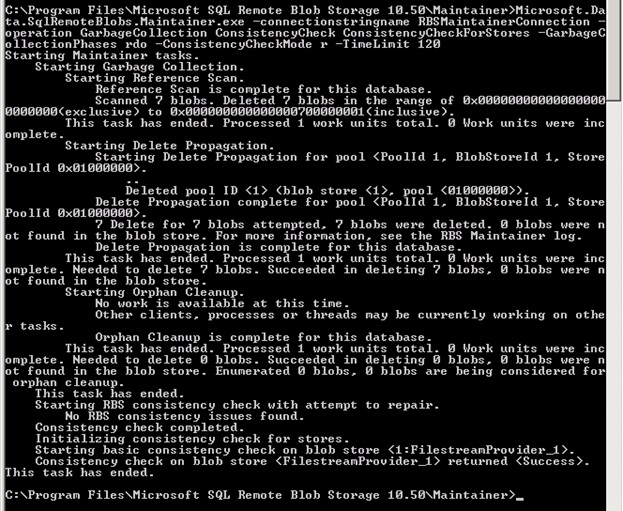
When you run Maintainer from Command Prompt you can trace the operation logs in cmd window:
1) On Sql server open CMD prompt as Administrator and navigate to the path “C:\Program Files\Microsoft SQL Remote Blob Storage 10.50\Maintainer”
2)Execute the command
Maintainer.exe -connectionstringname RBSMaintainerConnection -operation GarbageCollection ConsistencyCheck ConsistencyCheckForStores -GarbageCollectionPhases rdo
-ConsistencyCheckMode r -TimeLimit 120
You can get more information about Maintainer.exe parameters
http://blogs.msdn.com/b/sqlrbs/archive/2010/03/19/running-rbs-maintainer.aspx
for schedule an RBS Maintainer task please read following arcile:
http://technet.microsoft.com/en-us/library/ff943565(v=office.14).aspx
After you run RBS Maintainer , RS and DP phase completed the blob records will be cleared ! no not yet 🙂 . This operation is takes much 2 or 3 mintues and depends on how much data you have.

Image Source:http://blogs.technet.com/b/pramodbalusu/archive/2011/07/09/rbs-and-sharepoint-2010.aspx
“FILESTREAM GC runs as part of the database checkpoint process. This is what causes some confusion – an old FILESTREAM file will not be removed until after it is no longer needed AND a checkpoint runs. ”
http://www.sqlskills.com/BLOGS/PAUL/post/FILESTREAM-garbage-collection.aspx
In Simple recovery mode, you may run following command
CHECKPOINT;
In Full recovery mode, two transaction log with CHECKPOINT are needed
or
“Forces the FILESTREAM garbage collector to run, deleting any unneeded FILESTREAM files. A FILESTREAM container cannot be removed until all the deleted files within it have been cleaned up by the garbage collector. The FILESTREAM garbage collector runs automatically. However, if you need to remove a container before the garbage collector has run, you can use sp_filestream_force_garbage_collection to run the garbage collector manually”
http://msdn.microsoft.com/en-us/library/gg492195.aspx
USE <Content Database>;
GO
EXEC sp_filestream_force_garbage_collection @dbname = N'<Content Database>’;
And finally if still your BLOB data is not cleared than you may create a Case for Microsoft Support 🙂


 Bugra Postaci's Blog