Well , sharing an AppDomain between web application is a gray-out area so i decided to create an article for this.
Scope Note :
- This article does not contains “how to create and configure apps for SharePoint 2013”. You may find more information at the end of the article (Resources Section)
- This article does not cover SSL configurations.
In SharePoint 2013 , Sharing an “AppDomain” (exp: ContosoApps.com) between different web applications is possible but there are some limitations
1) Apps domains can be shared across web applications if the zone, application pool identity, and authentication schemes match. For example suppose that webappA is configured to use the Default zoneH and webappB is also configured to use the Default zone. In addition, both web applications use the same Application pool identity, and both web applications use NTLM. In this scenario, the web applications can share a single app domain.
2) You can share only one AppDomain allowed between different web applications. (Yes , with March PU you can use multiple AppDomains but it does not mean that you can share it directly )
Which is defined in CA-> Apps -> Configure Apps Url

Or via Powershell
Set-SPAppDomain <appDomain>
Set-SPAppSiteSubscriptionName -Name "app" -Confirm:$false
* As you can see , SharePoint only allows one global AppDomain by Set-SPAppDomain cmdlet .
Lets have a look an example ; I assume that you have already created Forward DNS Lookup Zone and set CNAME for “ContosoApps.com” alias.

For Detailed configuration please read the following TechNet article (As i said it is out of scope)
->Configure an environment for apps for SharePoint (SharePoint 2013)
https://technet.microsoft.com/en-us/library/fp161236.aspx
We want to share “ContosoApps.com” AppDomain via 3 different web applications
Web Application 1: Jüpiter
URL : http://jupiter
Bindings: HTTP:jupiter:80
Zone:Default
Application Pool : JupiterAppPool
Identity : Contoso\spfarm
Web Application 2: Neptün
URL : http://neptun
Bindings HTTP:neptun:80
Zone:Default
Application Pool : NeptunAppPool
Identity : Contoso\spfarm
Web Application 3: Uranüs
URL : http://uranus
Bindings HTTP:uranus:80
Zone:Default
Application Pool : UranusAppPool
Identity : Contoso\spfarm
(*If you want also you can use same Application pool for all)
Well all these 3 web Application has a host header , thats why we need another IIS Site (not required a SharePoint Web Application but you may also create as a SharePoint Web Application)
This is a dummy web application with no site collection inside. We are just using this for binding. Bindings http::80:* (wildcard) and should except all 80 Why becuase any request like
http://apps-85f5fc12a6a559.contosoapps.com must able to land a IIS Site so “http::80:* ” binding handles this kind of request. And have to be same application pool identity (Contoso\spfarm).
AppHost Web Application : Name -> AppHost
Url : (N/A)
Bindings :HTTP::80:*
Application Pool : AppHostPool
Identity : Contoso\spfarm
Check for more info if you want to get more details the “Routing Web Application” section http://blogs.technet.com/b/mspfe/archive/2013/01/31/configuring-sharepoint-on-premise-deployments-for-apps.aspx
So far so good , as you notices we dont enabled “SupportMultipleAppDomains” feature which is added to SharePoint 2013 via March PU.
There is a SSL version configuration by Steve,
http://blogs.technet.com/b/speschka/archive/2012/09/03/planning-the-infrastructure-required-for-the-new-app-model-in-sharepoint-2013.aspx
Now it is time to test. I used the Yammer App from SharePoint App Store .
After Installing Yammer App ;
Result in Browser :
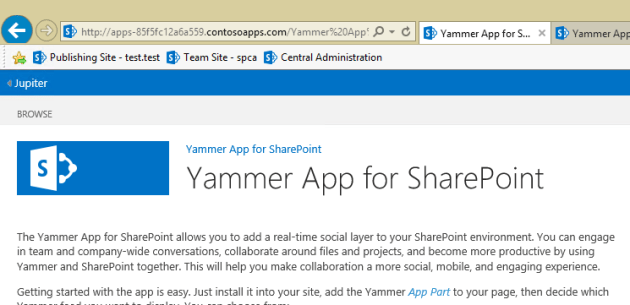

Note: Do not use “System Account” when you are adding Apps !
Each instance of an app for SharePoint that is installed has its own URL. Therefore, if you only have one app for SharePoint in your environment, but the app is installed on six different sites, then you will have six different app URLs. As you can see above pictures the AppID has changing.
What about enabling Multiple AppDomains feature ?
“One of the feature updates of the March 2013 Public Update for SharePoint 2013 enables you to use multiple app domains in SharePoint 2013 environments with alternate access mapping or host-header web application configurations. Before the Public Update, you could only host one app domain and it had to be in the Default zone. You could not use the app domain on alternate access mappings or host-header web application configurations. The Public Update enables you to configure an app domain for each web application zone and use alternate access mapping and host-header web application configuration”
https://technet.microsoft.com/en-us/library/dn144963.aspx
In SharePoint 2013 , you can use more than one AppDomain for one WebApplication but you can not share that specified appdomain between zones or different applications with that feature .This feature has been added after March PU . The new feature extends sharepoint powershell cmdlets with
New-SPWebApplicationAppDomain
Get-SPWebApplicationAppDomain
Remove-SPWebApplicationAppDomain
These cmdlets basically provide Isolation not for Sharing !
Example:
Adding another web application (4th one) to farm and this scenario we don’t want to use Shared AppDomain (ContosoApps.com) we want to assign a diffrent AppDomain (FabrikamApps.com) for this Web Application.
Web Application 4: Titan
Url : http://titan.fabrikam.com
Bindings :
HTTP:titan.fabrikam.com:80
HTTP::81:* (Why a second binding for a different port ? Because appdomain requires wildcard bindings)
Application Pool : TitanAppPool
Identity : Contoso\SPWeb
We need to enable Multiple App Domain Feature ; After we enabled the feature ( $contentService.SupportMultipleAppDomains = $true ) we can assign this web application a different AppDomain . (For more info Please read https://technet.microsoft.com/en-us/library/dn144963.aspx )
Created another Fwd Lookup Zone in DNS for another AppDomain . Exp : FabrikamApps.com

And then we can assign this AppDomain to 4th web application.
New-SPWebApplicationAppDomain –AppDomain “FabrikamApps.com” –port 81 –WebApplication http://titan.fabrikam.com
And test with a app (Again I use Yammer App)
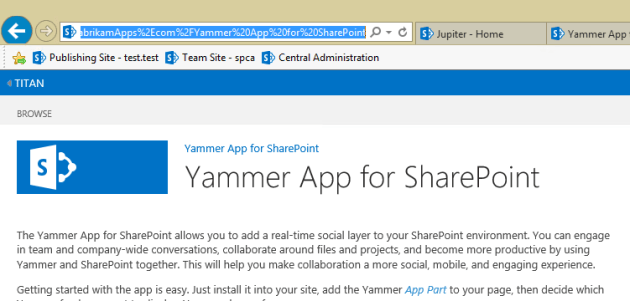
I will continue the scenario adding another web application like
Web Application 5
URL: http://europa.fabrikam.com
Bindings HTTP:europa.fabrikam.com:80
HTTP::82 :*
Application Pool: EuropaPool
Identity : Contoso\SPWeb
If we try to assing same AppDomain (FabrikamApps.com) for the 5th site , by design we face following error !.
Because only one AppDomain globally (well we can say the old way) can be shared in a Farm which is “ContosoApps.com”
PS C:\Users\spfarm> New-SPWebApplicationAppDomain -AppDomain “FabrikamApps.com” -Port 82 -WebApplication http://europa
“New-SPWebApplicationAppDomain : We can’t set this app domain because it’s
already being used by a different web application or for a different zone.”
* Using Multiple AppDomains feature we can extend one of the web Application for a different zone(like Internet) for example “Jüpiter” -> (jupiter.fabrikam.com) and assign a different AppDomain but we could not use or share another AppDomain if assigned to another web Application or same web Application in different zone !
What you can do;
Well what you can do ; you can share it by adding subdomain before the second appdomain like
TitanApps.FabrikamApps.com
EuropaApps.FabrikamApps.com
Configuration looks like this;
(if you set an appdomain for europa or titan webapplication before you have to remove the appdomain first)
New-SPWebApplicationAppDomain –AppDomain TitanApps.FabrikamApps.com –Zone Default –WebApplication http://titan –port 81 (according to configuration you may need to add free port binding (like HTTP::81:*) to same IIS site which is not used by SharePoint or any application)
New-SPWebApplicationAppDomain –AppDomain EuropaApps.FabrikamApps.com –Zone Default –WebApplication http://europa –port 82 (according to configuration you may need to add free port binding (like HTTP::82:*) to same IIS site which is not used by SharePoint or any Application)
(Don’t forget to make an IISRESET after use the cmdlets)
After that when you add YammerApp to both sites you will see the app url as below:
apps-da8447c0b8f71e.TitanApps.FabrikamApps.com for http://titan
apps-zd4847s0b5f63d.EuropaApps.FabrikamApps.com for http://europa
Resources:
Configure an environment for apps for SharePoint (SharePoint 2013)
https://technet.microsoft.com/en-us/library/fp161236.aspx
Enable apps in AAM or host-header environments for SharePoint 2013
https://technet.microsoft.com/en-us/library/dn144963.aspx
http://blogs.technet.com/b/mspfe/archive/2013/01/31/configuring-sharepoint-on-premise-deployments-for-apps.aspx
http://sharepointchick.com/archive/2012/07/29/setting-up-your-app-domain-for-sharepoint-2013.aspx
http://blogs.technet.com/b/speschka/archive/2012/09/03/planning-the-infrastructure-required-for-the-new-app-model-in-sharepoint-2013.aspx






 Bugra Postaci's Blog