In one of my previous article i have explained in details why you could not delete a content type from a specific list .
Unable to delete a content type from a List (TroubleShooting)
In this article i would like to explain the issue when you want to delete a content type from a site .
To able to delete a content type in a site there are some restrictions .If a content type is in use , you could not delete it. Meaning of “in use” depends following 2 restrictions to provide data integrity and prevent data lost
1) This content type should not be inherited by another content type
2) This content type should not be used in a list .
When you want to delete a content type, SharePoint is very safe to prevent the deletion if this content type in use , but there is problem here , Where this content type in use ?
There is no OOB tool to find it , you can use powershell to iterate all webs in that site and the lists to find it out but it is a little time consuming operation.
There is another and easy way to do it , if you have Access to SQL server in related content database and you can run following select queries.
declare @SiteId uniqueidentifier
declare @Class bit
declare @ContentTypeId tContentTypeId
declare @IsFieldId bit
/* You need following parameters */
SET @SiteId = ‘8893D8B3-87C2-410F-9DBA-89E8DAC9BB6E’
Set @Class = 1 /* Needs always 1 means is a ContentType */
Set @ContentTypeId = 0x0100A0E39C8B4EED1A47A72EE334ADB2D5D1
Set @IsFieldId = 0
/* Checkes for if given content inherited by another content type */
select ContentTypeId,Scope,[Version],ResourceDir,SolutionId,IsFromFeature
from ContentTypes WITH (INDEX=ContentTypes_SiteClassCTId, FORCESEEK)
where SiteId = @SiteId AND Class = @Class AND
ContentTypeId <= (@ContentTypeId + 0xFF) AND ContentTypeId > @ContentTypeId
/* Checkes for if given content is used by a list */
select W.FullUrl as Url ,L.tp_Title as ListTitle
from ContentTypeUsage WITH (INDEX=ContentTypeUsage_SiteIsFClassCTIdWeb, FORCESEEK)
Join Lists L on L.tp_ID = ContentTypeUsage.ListId
Join Webs W on W.Id = ContentTypeUsage.WebId
Where ContentTypeUsage.SiteId = @SiteId AND ((@IsFieldId IS NULL AND IsFieldId IS NULL) OR @IsFieldId=IsFieldId) AND
Class = @Class AND
ContentTypeId <= (@ContentTypeId + 0xFF) AND
ContentTypeId >= @ContentTypeId

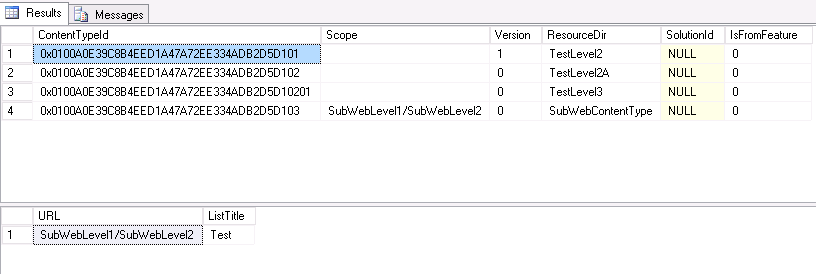
As you can see ; in first query result the content type inherited by other 4 content types , the name of the inheriters are in ResourceDir column. And Scope is Show which SubWeb in defined.
for second query results the content type in use for just for one list , which is present in http://contoso.com/SubWebLevel1/SubWebLevel2 -> List Name is “Test”
For delete this content type the action plan is simple
1) Delete all inherited content types.
2) Delete/Change any item if it is using this content type in “Test” List
3) Remove the content type form the Test List. (Dont forget this!!!)
Ok. How SharePoint understand a content type in use in site level ?
There is a stored procedure name proc_IsContentTypeInUse . I have adjusted above SQLs that according to this procedure as like How SharePoint does.
*Dont forget any direct changes for any SharePoint Database is not permitted. That can cause your system is not supported .So dont change (Update/Delete/Insert) anything by SQL.

 Bugra Postaci's Blog