Multiple Navigation Nodes Problem and Navigation Deadlock in SharePoint 2010

Symtoms:
Issue happens after  August 2012 CU installed for SharePoint Server 2010.

After publishing a new page the site load times start to increase dramatically or page requests don’t finish loading at all. You will see the infamous “An expected error has occurred“-error or if the callstack is enabled and custom errors are turned off in the web.config (CallStack=”true” / customErrors mode=”Off”) you will see a “Request timed out.” error-message.

System.Data.SqlClient.SqlException: Transaction (Process ID 76) was deadlocked on lock resources with another process and has been chosen as the deadlock victim. Rerun the transaction. at System.Data.SqlClient.SqlConnection.OnError(SqlException exception, Boolean breakConnection)
at System.Data.SqlClient.TdsParser.ThrowExceptionAndWarning(TdsParserStateObject stateObj)
at System.Data.SqlClient.TdsParser.Run(RunBehavior runBehavior, SqlCommand cmdHandler, SqlDataReader dataStream, BulkCopySimpleResultSet bulkCopyHandler, TdsParserStateObject stateObj)
at System.Data.SqlClient.SqlDataReader.HasMoreRows()
at System.Data.SqlClient.SqlDataReader.ReadInternal(Boolean setTimeout)
at Microsoft.SharePoint.SPSqlClient.ExecuteQueryInternal(Boolean retryfordeadlock)
at Microsoft.SharePoint.SPSqlClient.ExecuteQuery(Boolean retryfordeadlock)

PortalSiteMapProvider was unable to fetch children for node at URL: /<site>, message: An unexpected error occurred while manipulating the navigational structure of this Web., stack trace:
at Microsoft.SharePoint.SPGlobal.HandleComException(COMException comEx)
at Microsoft.SharePoint.Library.SPRequest.UpdateNavigationNode(String bstrUrl, Int32 lNodeId, DateTime dateParented, String bstrName, String bstrNodeUrl, Object& pvarProperties, String& pbstrDateModified)
at Microsoft.SharePoint.Navigation.SPNavigationNode.Update()

Resolution:
 SharePoint April 2013 CU

For more details and for workarounds :
http://blogs.msdn.com/b/joerg_sinemus/archive/2013/02/12/february-2013-sharepoint-2010-hotfix.aspx
The form cannot be rendered. This may be due to a misconfiguration of the Microsoft SharePoint Server State Service

First check that the state service Application has started and State Service Application Proxy has been assigned to your web Application ;

Open your Central Administration
Go to Application Management
Under Service Applications click Configure service application associations
Click on the Application Service Proxy Group of the WebApplication you’re trying your workflow on
Find State Service Application and make it checked .

If you dont have State Service Application you can create a new one by below;

1. Click and lunch  Start->All Programs -> Microsoft SharePoint 2010 Products->  SharePoint 2010 Management Shell .
2. In Windows PowerShell, type $stateapp= New-SPStateServiceApplication -Name “State Service Application”
3. Create a State Service database and associate it with a service application, by typing New-SPStateServiceDatabase -Name “StateServiceDatabase” -ServiceApplication $stateapp
4. Create a State Service Application Proxy and associate it with the service application by typing New-SPStateServiceApplicationProxy -Name “State Service Application Proxy” -ServiceApplication $stateapp -DefaultProxyGroup

http://technet.microsoft.com/en-us/library/ee704548(v=office.14).aspx


SharePoint Pages are not loaded correctly behind Load Balancer.

Assume following scenario ;
You have a custom 3rd party load balancer and you would like to publish only a Subsite of a site collection in SharePoint 2010 through NLB. This scenario is one of specific one , and usually is not supported all load balancers.
Some of 3rd party load balancer can be configure with rules for extra redirections.

In Our Scenario we have
One 3rd party network load balancer (NLB) which is also supporting SSL termination.
And we have a SharePoint farm which is publishing following site
http://blog.bugrapostaci.com -> is our root site collection and we don’t want to redirect through load balancer,
There should be many reasons you don’t want to publish root site directly; security concern, or already referencing another site etc.
https://blog.bugrapostaci.com/Information -> this is our subsite that we want to request through NLB . We are assuming that this site is not contains any customization and pure Sharepoin Team site template.
(Because some customized sites can be requesting extra Web Services or URLs to configure)

First you need to configure your load balancer with SSL termination and installing correct certificate which is out of scope for this article then on SharePoint you need to configure Alternate Access Mapping correctly supporting HTTPS termination.

A sample of correct configuration like this;

Internal URL                                    Zone      Public URL
https://blog.bugrapostaci.com  internet https://blog.bugrapostaci.com
http://blog.bugrapostaci.com     internet https://blog.bugrapostaci.com

Than you need to add rules for NLB for redirecting requests to correct server by HTTPS protocol and any URL contains subsite string of “Information” (our subsite part) . For configuration and how to adding rules to NLB you may need to contact with NLB vendor or check for the usage Manuel.

But this rules are not enough; if you check the site you can detect that page is not working correctly. Why ? Because when you make a request a page it has need to make extra sub requests
You can detect which requests are done at background using Fiddler2 or using F12 Developer tool for IE or Firebug extension of Firefox browser.

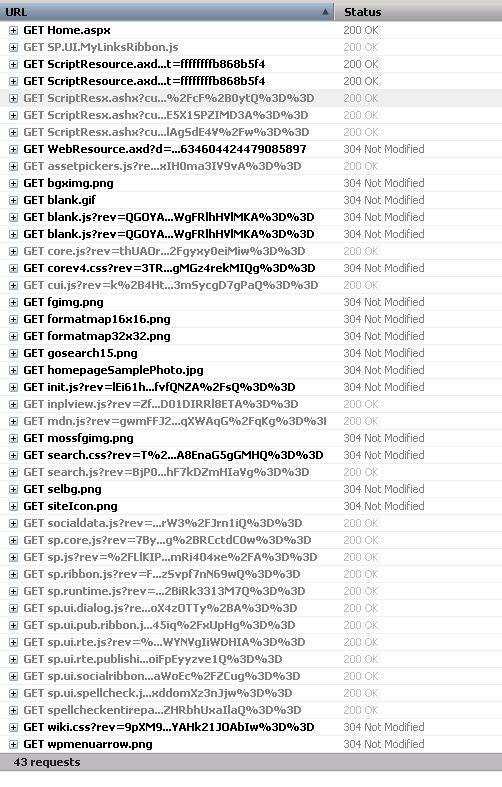
Here you can see a sample request when I browse the page of https://blog.bugrapostaci.com/Information site

requests

In you can see details; there are 43 requests more.


/Information/SitePages/Home.aspx        38,838  private, max-
/ScriptResource.axd?d=3deuDBoJpstM_vnvogSCBV0kbvg4UPvUtpa
/ScriptResource.axd?d=A9qblnwldHbcO4ZGhCK8Ss2nKdc2cWEIJ75
/WebResource.axd?d=Q1l5fspXysTdsR10hp_rImYHRKCODxQ3Hk5D7d
/_layouts/1033/init.js?rev=lEi61hsCxcBAfvfQNZA%2FsQ%3D%3D
/_layouts/1033/styles/Themable/corev4.css?rev=3TRomkG1g2g
/_layouts/1033/styles/Themable/search.css?rev=T%2Bhraxktc
/_layouts/1033/styles/Themable/wiki.css?rev=9pXM9jgtUVYAH
/_layouts/blank.js?rev=QGOYAJlouiWgFRlhHVlMKA%3D%3D
/_layouts/images/bgximg.png
/_layouts/images/blank.gif

And some of the is directly coming from root site. That’s mean just adding a rule for redirecting only subsite string of “Information” is not enough.Here is a sample list for possible requests coming form when you make a request to Subsite. You should add necessary rules for this requests.

“/Information” -> the subsite url part.
“/_controltemplates”
“/_layouts”  -> Images ,Styles, Javascripts
“/_vti_bin”
“/_wpresouces”
“/App_Browsers”
“/App_GlobalResources”
“/wpresouces”
“/_app_bin”
“/_vti_pvt”
“/_forms”
“/_login”
“/_windows”
“/ScriptResource.axd” -> Handlers
“/WebResource.axd”  -> Handlers.

this sample is only valid for pure SharePoint Team Site Template without customization ; So if you have some customizations and extra webservices requests or using another paths .
I could not you tell extra url names but I can show you how could you catch a fish

You can test with;

Getting a Fiddler,Developer Tool for IE or Firebug extension for Firebug trace on Server without https and make request to your Subsite . You can see all needed requests and files need to be loaded for working this page is correctly. Make a list for it;
Do it same operation behind Load Balancer and test , add missing redirections to 3rd party load balancer rules for them.

Securitytoken.svc cannot be activated due to an exception

“SharePoint 2010 Server stops working after installing KB 2756920”
“Problems with SharePoint 2010 Server after installing Windows Updates, like – Errors in the navigation panes – Complete failure to open any site – SharePoint sites will return 503 server error.When you check the Server’s Event- and/or ULS logs, you may find some errors similar to these:

Sender Information: System.ServiceModel.ServiceHostingEnvironment+HostingManager/17653682
Exception: System.ServiceModel.ServiceActivationException: The service ‘/SecurityTokenServiceApplication/securitytoken.svc’ cannot be activated due to an exception during compilation. The exception message is: Method not found: ‘System.String System.ServiceModel.Activation.Iis7Helper.ExtendedProtectionDotlessSpnNotEnabledThrowHelper(System.Object)’.. —> System.MissingMethodException: Method not found: ‘System.String System.ServiceModel.Activation.Iis7Helper.ExtendedProtectionDotlessSpnNotEnabledThrowHelper(System.Object)’.”

Support for Microsoft Windows Server 2008 R2 RTM +SP1 started on Febr. 22nd 2011!  you need to be at least on SP1.
Check out the lifetime support matrix here:  http://support.microsoft.com/lifecycle/?p1=14134

For Details:
http://blogs.technet.com/b/steve_chen/archive/2013/01/11/3545423.aspx

MOSS 2007 SP2 and WSS3.0 SP2 Support has ended

According to MS Product Life Cycle , Microsoft Office SharePoint Server (MOSS) Service Pack 2 and Windows SharePoint Service (WSS) SP2   supports has ended yesterday.If you do not upgrade your MOSS 2007 and WSS 3 server to SP3 level than you may not get fully support from Microsoft Support.
the minimal supported version is WSS 3.0 SP3 and MOSS SP3
http://support.microsoft.com/lifecycle/default.aspx?LN=en-us&p1=14414&x=11&y=11
http://support.microsoft.com/lifecycle/default.aspx?LN=en-gb&p1=12200&x=11&y=6