Unable to delete RBS Blob data from File system even deleting from SharePoint 2010

Consider fallowing scenario that you have SQL Server 2008 R2  RBS enabled, and SharePoint Server 2010 RBS installed servers . You have some files that stored in SharePoint document library whichs streams are stored in RBS and even you deleted this files form SharePoint Document Library you noticed that the Blob data in file system still remaining.

Usually this is not a problem it is by design issue , because purpose of data recovery ,performance consideration, data integrity and safety the deleted files in real are not deleted immediately. So many systems are designed like this as SharePoint and also RBS included. In that kind of systems as a manner of being on the safe side they are just mark the files are deleted and than runs some background process later for deleting files according when some thresholds or limits are exceeded. If you what to find out this issue is a real problem you have to disable or make shut down this functionalities and after doing this still the blob files are remain on file system then you can say that you have a real problem.

On SharePoint side First thing you should check that the feature of Recycle Bin.

Recycle Bins are used to help users protect and recover data.Microsoft SharePoint Server 2010 supports two stages of Recycle Bins: the first-stage Recycle Bin and second-stage Recycle Bin.When a user deletes an item, the item is automatically sent to the first-stage Recycle Bin. By default, when an item is deleted from the first-stage Recycle Bin, the item is sent to the second-stage Recycle Bin. A site collection administrator can restore items from the second-stage Recycle Bin.You turn on and configure Recycle Bins at the Web application level. By default, Recycle Bins are turned on in all the site collections in a Web application. This article describes how to configure Recycle Bin settings for a Web application.”
http://technet.microsoft.com/en-us/library/cc263125(v=office.14).aspx

For more information and usage recommendations about SharePoint Server 2010 Recycle Bins, see Plan to protect content by using recycle bins and versioning (SharePoint Server 2010).

In that Point you have two option to bypass this feature that 1) you can totally disable Recycle Bin from Central Administrations site by CA-> Manage Web Application -> Select web Application which you decided to disable Recycle bin feature -> on Ribbon Menu Select General Settings and set “Recycle Bin” property as “Off”
2) or when you delete a file you can clear Site (First-stage) and Site Collection (Second-Stage) Recycle bins.

On SQL side in Content Database if you want to be sure and confirm deletion of the file you can use fallowing SQL .
1) Open SQL Server Management Studio
2) Select related Content Database and click “New Query”
3) Select * from AllDocs where ListID='<GUID>’
*** You can find List Guid on Browser Address bar when you open Library Settings page of a document libarary.
and check results for the file still is exists in that list .If you clear correct there should not be the related file is present on the results.

Even that you confirm that the file has been deleted from Content Database will still the Blob Data remains in File System where the blobs are stored. Becuase there is another mechanizm in SQL RBS side named “RBS Garbage Collector”

“SharePoint Server 2010 automatically marks unreferenced or deleted BLOB data for removal. SharePoint Server 2010 counts references to BLOBs by looking at the list of BLOB IDs stored by SharePoint Server 2010 in its content databases at the time of removal. Any BLOB references that are present in the RBS store tables but absent in the content database are assumed to be deleted by SharePoint Server 2010 and will be marked for removal. BLOBs that are not present in the content database and were created before the orphan cleanup time window, described later in this article, are also assumed to be deleted by SharePoint Server 2010 and will be marked for removal.

Because SharePoint Server 2010 tabulates BLOB references from the RBS columns of the content database, every RBS column must have a valid index before it can be registered in RBS.

The SQL Server RBS Maintainer tool removes the items marked by SharePoint Server 2010 for removal. You should schedule the clean-up tasks to be run during off-peak hours to reduce the effect on regular database operations.

RBS garbage collection is performed in the following three steps:

  • Reference scan.(RC)  The first step compares the contents of the RBS tables in the SharePoint Server 2010 content database with RBS’s own internal tables and determines which BLOBs are no longer referenced. Any unreferenced BLOBs are marked for deletion.
  • Delete propagation. (DP) The next step determines which BLOBs have been marked for deletion for a period of time longer than the garbage_collection_time_window value and deletes them from the BLOB store.
  • Orphan cleanup. (OC) The final step determines whether any BLOBs are present in the BLOB store but absent in the RBS tables. These orphaned BLOBs are then deleted”

http://technet.microsoft.com/en-us/library/ff943565(v=office.14).aspx

We have talked about ThreshHolds . In RBS configuration we have 3 important threshold for clearing BLOB data.

delete_scan_period :Specifies the minimum amount of time that must pass between two reference scan garbage collection runs. The default value is 30 days
orphan_scan_period: Specifies the minimum amount of time that must pass between two orphan cleanup garbage collection runs. The default value is 30 days
garbage_collection_time_window : Specifies the minimum time that must pass between identifying a blob as having no references in the database and deleting the blob from the store. This guarantees the availability of BLOBs for the specified time in case a backup is restored. The default value is 30 days.

So according to default values , your BLOB files should be cleared after 30 days , if they are not referenced to any Content Database record.
You can get more information about all configuration thresholds about RBS with following article:
http://msdn.microsoft.com/en-us/library/gg316763(v=sql.105).aspx

For testing immediate delete we can change these threashold .From SQL Server Management Studio:
1)Open SQL Server Management Studio
2)Select RBS enabled Content Database and click “New Query”
3) Execute following queries.
exec mssqlrbs.rbs_sp_set_config_value ‘garbage_collection_time_window’, ‘time 00:00:00’;
exec mssqlrbs.rbs_sp_set_config_value ‘delete_scan_period ‘, ‘time 00:00:00’;
exec mssqlrbs.rbs_sp_set_config_value ‘orphan_scan_period’, ‘time 00:00:00’;

Our job is not done yet:
The actual work of GC is done by the RBS Maintainer application. The maintainer is a console application that takes command line parameters such as the connection string to the database and the phases of GC to execute. This can be run from any machine that has access to the DB and the blob store(s). It can also be run from multiple machines simultaneously. You can schedule it using your favorite scheduler e.g. Windows Task Scheduler.

 Maintainer also takes an optional parameter to limit the amount of time it is run
http://blogs.msdn.com/b/sqlrbs/archive/2008/08/08/rbs-garbage-collection-settings-and-rationale.aspx

RBS requires you to define a connection string to each database that uses RBS before you run the RBS Maintainer. This string is stored in a configuration file in the <RBS installation path>\Microsoft SQL Remote Blob Storage 10.50\Maintainer folder that is ordinarily created during installation. The RBS Maintainer can be run manually by executing the Microsoft.Data.SqlRemoteBlobs.Maintainer.exe program together with the parameters that are listed in the following table.
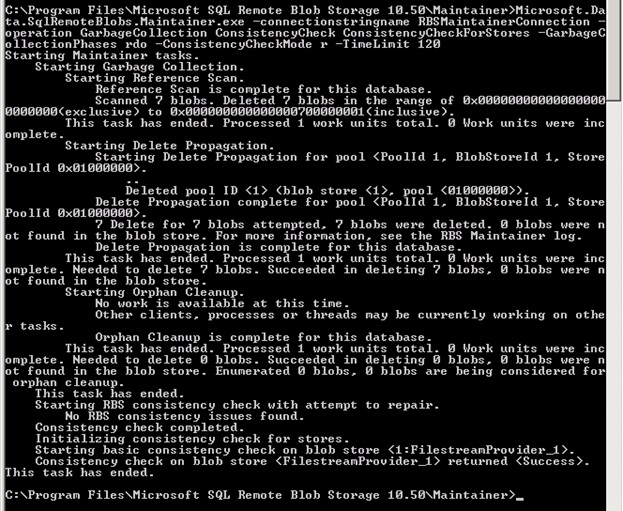
When you run Maintainer from Command Prompt you can trace the operation logs in cmd window:

1) On Sql server open CMD prompt as Administrator and navigate to the path “C:\Program Files\Microsoft SQL Remote Blob Storage 10.50\Maintainer”

2)Execute the command
Maintainer.exe -connectionstringname  RBSMaintainerConnection -operation GarbageCollection ConsistencyCheck ConsistencyCheckForStores -GarbageCollectionPhases rdo
-ConsistencyCheckMode r -TimeLimit 120

You can get more information about Maintainer.exe parameters
http://blogs.msdn.com/b/sqlrbs/archive/2010/03/19/running-rbs-maintainer.aspx
for  schedule an RBS Maintainer task please read following arcile:
http://technet.microsoft.com/en-us/library/ff943565(v=office.14).aspx

After you run RBS Maintainer , RS and DP phase completed the blob records will be cleared ! no not yet 🙂 . This operation is takes much 2 or 3 mintues and depends on how much data you have.
RBSGC
Image Source:http://blogs.technet.com/b/pramodbalusu/archive/2011/07/09/rbs-and-sharepoint-2010.aspx


FILESTREAM GC runs as part of the database checkpoint process. This is what causes some confusion – an old FILESTREAM file will not be removed until after it is no longer needed AND a checkpoint runs. 
http://www.sqlskills.com/BLOGS/PAUL/post/FILESTREAM-garbage-collection.aspx

In Simple recovery mode, you may run following command
CHECKPOINT;
In  Full recovery mode, two transaction log with CHECKPOINT are needed
or

“Forces the FILESTREAM garbage collector to run, deleting any unneeded FILESTREAM files. A FILESTREAM container cannot be removed until all the deleted files within it have been cleaned up by the garbage collector. The FILESTREAM garbage collector runs automatically. However, if you need to remove a container before the garbage collector has run, you can use sp_filestream_force_garbage_collection to run the garbage collector manually
http://msdn.microsoft.com/en-us/library/gg492195.aspx

USE <Content Database>;
GO
EXEC sp_filestream_force_garbage_collection @dbname =  N'<Content Database>’;

And finally if still your BLOB data is not cleared than you may create a Case for Microsoft Support 🙂

December 2012 CU for SharePoint 2010 has been released

Please Read for more Details:
http://blogs.technet.com/b/stefan_gossner/archive/2012/12/27/december-2012-cu-for-sharepoint-2010-has-been-released.aspx

Why we are using warm-up scripts

SharePoint is built upon the Microsoft .NET Framework and ASP.NET, specially the 2.0 releases of those technologies. ASP.NET is architected so that its pages are not compiled until the first time a server request .As you know when an IIS worker process has coming up for the first time , It makes lots of jobs in the background. The big portion of this time used by compiling assemblies, and reading configurations  . For a standard ASP.Net application it takes very small time but for a SharePoint Application we have tons of assemblies and configurations and more than one WCF services which is need to be activated . So it will usually takes more time over 1 minutes. The warm up duration also depends on your configuration , hardware and assembly counts and changes for every system.

The issue happens when application pool recycle, iisreset or a worker process crashes.  And for SharePoint sites every application pool has a configuration that force the recycle itself . You can check from IIS -> Application Pools -> (For example Select “SharePoint Central Administration v4”) and right click   Select Recycling option And you can see the recycle time.

We have also an Idle Time Out property defined in Application Pool settings that make free worker processes resources which are in idle state for defined time period . Configure Idle Time-out Settings for an Application Pool (IIS 7) http://technet.microsoft.com/en-us/library/cc771956(v=WS.10).aspx

However even it is disabled by setting “Idle Time Out” value to 0 still IIS requires and also suggested way that recycle application pools daily manner. The default IIS behavior of naturally cycling an app pool somewhere between 1am and 3am or off hours if there is such a thing is healthy to clean out the memory space in IIS. Also same consideration is valid for SharePoint Timer service , there is a Timer job in SharePoint for responsible to restart timer service in daily manner. It is a good and suggested thing http://blogs.msdn.com/b/besidethepoint/archive/2012/01/10/the-timer-recycle-job-job-timer-recycle.aspx

But sometime in the midnight a recycle occurs and assume that no one send a request a server until morning and when a user open his browser and try to connect SharePoint site He/She should wait more, because the worker process is only getting up until the first time a server get the request. Warm up scripts send a requests to your server for a scheduled time  that forces IIS to worker process up and running .when a user’s request a page through a browser, preventing your users from seeing a delay when making that first request. That’s pretty much all they do, and the only purpose most of them serve is to “warm up” your server by having precompile your site’s ASP.NET pages ahead of an actual user request. You can use warm up scripts .

For the warm up scripts which is described in fallowing article http://blogs.technet.com/b/rgullick/archive/2011/12/02/minimalist-sharepoint-warmup-script.aspx have very common usage on this kind of issues.


SharePoint 2010 Form based authentication problem Event ID:1315 and Event ID:8306

Assume that you have a SharePoint 2010 site with configured as Claim Based Authentiction with custom SQL Membership . You have move your site and membership database to another server and you have facing with connection problems on existing SQL MemberShip users by getting this fallowing errors

In ULS Logs:

11.13.2012 15:40:18.20 w3wp.exe (0x18C8) 0x17C8 SharePoint Foundation Claims Authentication 0000 Unexpected Password check on ‘user@mail.com’ generated exception: ‘System.ServiceModel.FaultException`1[Microsoft.IdentityModel.Tokens.FailedAuthenticationException]: The security token username and password could not be validated. (Fault Detail is equal to Microsoft.IdentityModel.Tokens.FailedAuthenticationException: The security token username and password could not be validated.).’.

11.13.2012 15:40:18.20 w3wp.exe (0x18C8) 0x17C8 SharePoint Foundation Claims Authentication fo1t Monitorable SPSecurityTokenService.Issue() failed: System.ServiceModel.FaultException`1[Microsoft.IdentityModel.Tokens.FailedAuthenticationException]: The security token username and password could not be validated. (Fault Detail is equal to Microsoft.IdentityModel.Tokens.FailedAuthenticationException: The security token username and password could not be validated.).

and In Event logs
Presence of Event ID 8306 in the Application Event Log
11/08/2012 03:29:11 PM Error SERVERA 8306 Microsoft-SharePoint Products-SharePoint Foundation Claims Authentication DOMAIN\User An exception occurred when trying to issue security token: The security token username and password could not be validated..

Presence of Event ID 1315 in the Application Event Log with Event code: 4006
Event message: Membership credential verification failed.

The problem is here if you try to login site with one of existing FBA user even password is correct , cound not able to validate password . If you create a new FBA user , there is no problem on login.
The main cause of this issue could be changes of the Machine Key.

Why ?

The Password information is stored in the aspnet_Membership table in Asp.Net Membership database . The   SqlMembershipProvider allows for passwords to be stored in the database    using one of the following three techniques:

  • Clear – the password is stored in the database as plain-text. I strongly        discourage using this option. If the database is compromised – be it by a hacker        who finds a back door or a disgruntled employee who has database access – every        single user’s credentials are there for the taking.
  • Hashed – passwords are hashed using a one-way hash algorithm and a randomly        generated salt value. This hashed value (along with the salt) is stored in the database.
  • Encrypted – an encrypted version of the password is stored in the database

The password storage technique used depends on the SqlMembershipProvider    settings specified in Web.configThe default behavior is to    store the hash of the password.
the particular encryption or hashing algorithm used by the SqlMembershipProvider is determined by the settings in the <machineKey> element.

for more information:
http://www.asp.net/web-forms/tutorials/security/membership/creating-the-membership-schema-in-sql-server-vb
http://www.asp.net/web-forms/tutorials/security/introduction/forms-authentication-configuration-and-advanced-topics-vb

So if you have move your site to another server you may consider that the MachineKey if anyhow is changed , the existing users’ passwords can not be validated.

1) First Check for the MachineKey values in web.config for related your FBA SharePoint site. If you have any difference on target site make them equalize.
2) Also don’t forget to check other servers in your farm for the same site should be same MachineKey. If any difference in MachineKeys may cause integrity problems.

Somehow If the data integrity has broken , recreating users or forcing the users reset their password will help about the issue.


SharePoint Slow Warm-Up Problem

It is a well known issue that  if you have a SharePoint and after you recycle the application pool of site or make an iisreset or any movement that force to recycle (web.config modifications etc.),When the first request send to the server , the response of the server is very slow for the first time like 2 minutes. After this first slow reponse ,your server begins responding very quickly. We are calling this duration as warm up state.
So what’s happening in warm up ? In warm up state basically your worker process are getting up, while a worker process is getting up, the necessary assemblies are compiled and loaded , and needed configuration files are read and prepare the process for serving  the requests. If your web site has integrated with other sites in same server also may need to warm up sequence for other worker process and the process of our site can wait other process’s warmup to create a reliable response to you. And expected that all this operations could take some time that is depended on your assembly count, configuration, hardware etc.

But what if it is taking more than usual ? For example assume  that you have identical sharepoint site hosting in identical two farm and the warm up times are different like first instace of the site hosted server A have 20-30sec warm up and second instance of the site hosted in Server B it takes 180seconds.. So there should be a problem here.

This problem occurs because a .NET Framework 2.0 managed assembly that has an authenticode signature takes longer than usual to load.when loading signed assemblies the .net Framework 2.0 checks the Internet based Certificate Revocation list for verifing these signatures and the signatures is always verified when the .NET Framework 2.0 managed assembly that has an authenticode signature is loaded .And SharePoint has lots of signed assemblies.For some environment if does not have any Access to internet it causes a delay like 2 minutes to respond .

If you collect a process monitor log from your worker process , you may face the time gap bettween fallowing context.

14:57:39,6298324 w3wp.exe 3648 TCP Reconnect SERVERB.postman.local:63017 -> 80-239-149-10.customer.teliacarrier.com:http SUCCESS Length: 0, seqnum: 0, connid: 0 14:57:46,6170930 w3wp.exe 3648 RegCloseKey HKU\S-1-5-21-220523389-842925246-682003330-29313\Software\Microsoft\Windows\CurrentVersion\Internet Settings\Connections SUCCESS

0 ntoskrnl.exe CmpCallCallBacks + 0x1c0 0xfffff80001a25fc0 C:\Windows\system32\ntoskrnl.exe
1 ntoskrnl.exe  ?? ::NNGAKEGL::`string’ + 0x364df 0xfffff800019c28f6 C:\Windows\system32\ntoskrnl.exe
2 ntoskrnl.exe ObfDereferenceObject + 0xd4 0xfffff8000168a3d4 C:\Windows\system32\ntoskrnl.exe
3 ntoskrnl.exe ObpCloseHandleTableEntry + 0xc4 0xfffff80001973b94 C:\Windows\system32\ntoskrnl.exe
4 ntoskrnl.exe ObpCloseHandle + 0x94 0xfffff80001974144 C:\Windows\system32\ntoskrnl.exe
5 ntoskrnl.exe KiSystemServiceCopyEnd + 0x13 0xfffff80001680453 C:\Windows\system32\ntoskrnl.exe
6 ntdll.dll ZwClose + 0xa 0x7748140a C:\Windows\System32\ntdll.dll
7 kernel32.dll RegCloseKey + 0xbc 0x77324cd0 C:\Windows\System32\kernel32.dll
8 winhttp.dll CRegBlob::~CRegBlob + 0x1c 0x7fef98fb768 C:\Windows\System32\winhttp.dll
9 winhttp.dll ReadWinInetProxySettings + 0x1fb 0x7fef990a9f7 C:\Windows\System32\winhttp.dll
10 winhttp.dll WinHttpGetIEProxyConfigForCurrentUser + 0x28a 0x7fef990a674 C:\Windows\System32\winhttp.dll
11 cryptnet.dll InetGetProxy + 0x11e 0x7fef69eae42 C:\Windows\System32\cryptnet.dll
12 cryptnet.dll InetSendAuthenticatedRequestAndReceiveResponse + 0x190 0x7fef69e9237 C:\Windows\System32\cryptnet.dll
13 cryptnet.dll InetSendReceiveUrlRequest + 0x57e 0x7fef69e983d C:\Windows\System32\cryptnet.dll
14 cryptnet.dll CInetSynchronousRetriever::RetrieveObjectByUrl + 0xc4 0x7fef69e9d9c C:\Windows\System32\cryptnet.dll
15 cryptnet.dll InetRetrieveEncodedObject + 0xbf 0x7fef69e29c5 C:\Windows\System32\cryptnet.dll
16 cryptnet.dll CObjectRetrievalManager::RetrieveObjectByUrl + 0x15c 0x7fef69e2ef0 C:\Windows\System32\cryptnet.dll
17 cryptnet.dll CryptRetrieveObjectByUrlWithTimeoutThreadProc + 0xc1 0x7fef69e9acc C:\Windows\System32\cryptnet.dll
18 kernel32.dll BaseThreadInitThunk + 0xd 0x7732652d C:\Windows\System32\kernel32.dll
19 ntdll.dll RtlUserThreadStart + 0x1d 0x7745c521 C:\Windows\System32\ntdll.dll


This proves that the CRL check causes delay. For a resolution you can disable CRL check on .net level

You can find more detail and how to fix it this problem in following KB Article. http://support.microsoft.com/kb/936707

This hotfix adds the generatePublisherEvidence configuration setting to the .NET Framework 2.0. After you apply this hotfix, you can use this configuration setting to disable signature verification in a .NET Framework 2.0 managed application.  You can use this configuration setting in an application configuration file.  To do this, add the following code to the <ApplicationName>.exe.config file for the .NET Framework 2.0 managed application:

<configuration>
	<runtime>
		<generatePublisherEvidence enabled="false"/>
	</runtime>
</configuration>

If your application is hosted in IIS, change one of the following:

  • C:\Windows\Microsoft.NET\Framework\v2.0.50727\aspnet.config
  • C:\Windows\Microsoft.NET\Framework\v2.0.50727\CONFIG\machine.config

NoteOn x64 machines, you must also change one of the following:

  • C:\Windows\Microsoft.NET\Framework64\v2.0.50727\aspnet.config
  • C:\Windows\Microsoft.NET\Framework64\v2.0.50727\CONFIG\machine.config