Date format is not correct in the DataFormWebPart SharePoint 2010

Ok there is some problem when formatting date’s which is different than US format when using XsltListViewWebPart has defined by Microsoft. This happens because the ddwrt:FormatDate function expects the data format to be in UTC and the XSLTListViewWebPart returns the date preformatted to the Web Locale or Locale Date/Time .

To fixing this issue Microsoft has released a new feature ,A new Property, EnableOriginalValue, has been added to the XlstListViewWebPart that unblocks this scenario by February CU 2012.

You can check fallowing article for more information:
http://support.microsoft.com/kb/2580994

For DataFormWebPart;the option is to use the DataFormWebPart with the following property set to false on the <SPDataSource> tag: UseServerDataFormat.
Make UseServerDataFormat property set to false the DataFormWebPart will receive the Date/Time in UTC format and then the ddwrt:FormatDate function will work accurately.

Or you can use power of xslt to format date as you wish:
Fallowing example will help you to how to do it.

Add fallowing codes in DataFormWebPart for suitable place for xsl:template

<xsl:template name=”FormatCorrectDate”>
<xsl:param name=”dateValue” />
<xsl:param name=”monthFormat” />

<!– Sperater is important here it should be “.” or “/” according your current language settings –>
<xsl:variable name=”day” select=”substring-before($dateValue, ‘.’)” />
<xsl:variable name=”month” select=”substring(substring-after($dateValue, ‘.’), 1, 2)” />
<xsl:variable name=”year” select=”substring(substring-after(substring-after($dateValue, ‘.’), ‘.’), 1, 4)” />

<!– Create US Date Format –>
<xsl:variable name=”USDate”>
<xsl:value-of select=”$month” />/<xsl:value-of select=”$day” />/<xsl:value-of select=”$year” />
</xsl:variable>

<!– Month Notation –>
<xsl:variable name=”monthString”>
<xsl:choose>
<xsl:when test=”$monthFormat=’M1′”>
<xsl:value-of select=”$month” />
</xsl:when>

<xsl:when test=”$monthFormat=’M2′”>
<xsl:value-of select=”ddwrt:FormatDateTime(string($USDate), 1055, ‘MMM’)” />
</xsl:when>
<xsl:otherwise>
<xsl:value-of select=”ddwrt:FormatDateTime(string($USDate), 1055, ‘MMMM’)” />
</xsl:otherwise>

</xsl:choose>
</xsl:variable>

<!– Create Date –>
<xsl:choose>
<xsl:when
test=”string-length($day) = 1″>0</xsl:when>
</xsl:choose>

<xsl:value-of select=”$day” />-<xsl:value-of select=”$monthString” />-<xsl:value-of select=”$year” />
</xsl:template>

Call formatting template where you can needed in code :

<xsl:call-template name=”FormatCorrectDate”>
<xsl:with-param name=”dateValue” select=”string(@Created)” />
<xsl:with-param name=”monthFormat”>M2</xsl:with-param>
</xsl:call-template>

Resources:
https://www.nothingbutsharepoint.com/sites/eusp/Pages/Bug-With-SharePoint-2010-XSLT-DateFormat-Function.aspx
http://social.msdn.microsoft.com/forums/en-US/sharepointcustomization/thread/7a636804-1ff1-4bb8-8bcd-9ef713d15680
http://support.microsoft.com/kb/2580994
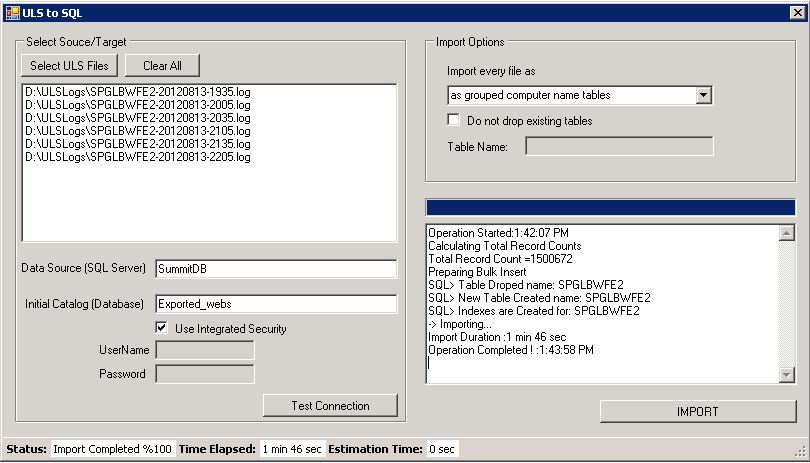
Import ULS log files to SQL Server database for Sharepoint 2010

Sometime you may need to import ULS log files to SQL server . It can be done with several ways by using SQL Server import tools or import from an Excel file to SQL  server. Or you can use fallowing free open source windows application tool. With this tool it can be done with more quickly . By multy-threading and bulk insert architecture feature provides you that ULS logs contains total 1.500.000 row  can be upload in  apprx. 2 minutes. (as you know it depends on your configuration and hardware)

Than you can query SQL tables as you wish : Fallowing query will return execution time over 1 sec for SPMonitoring event records.

select * from WFE1
where [ExecutionTime] > 1000 and [Eventid] =’b4ly’
order by [ExecutionTime] desc

“All These source codes are freeware and is provided on an “as is” basis without warranties of any kind, whether express or implied, including without limitation warranties that the code is free of defect, fit for a particular purpose or non-infringing. The entire risk as to the quality and performance of the code is with the end user

For Download  ULStoSQLImporter v1.0  for Sharepoint 2010:
http://spstools.codeplex.com/releases/view/93135

Unable to create DataSource with using Excel Service in DashBoard Designer

The symptoms are when you lunch PerformancePoint DashBoard Designer and try to create a new Data Connection like
Right Click Data Connections and select “New DataSource” -> Excel Services and Click Ok. you should have get an error like
“An unexpected system error has occured.Additional details have been logged for your administrator.”

In ULS Logs you can see the fallowing error:

An unexpected error occurred.  Error 8205.  Exception details: System.Web.Services.Protocols.SoapException: You do not have permissions to open this file.
at System.Web.Services.Protocols.SoapHttpClientProtocol.ReadResponse(SoapClientMessage message, WebResponse response, Stream responseStream, Boolean asyncCall)
at System.Web.Services.Protocols.SoapHttpClientProtocol.Invoke(String methodName, Object[] parameters)
at Microsoft.PerformancePoint.Scorecards.Client.ExcelService.OpenWorkbook(String workbookPath, String uiCultureName, String dataCultureName, Status[]& status)
at Microsoft.PerformancePoint.Scorecards.DataSourceProviders.ExcelServicesDataSourceProvider.GetCubeMetaData(Boolean extendedMetadata)
at Microsoft.PerformancePoint.Scorecards.Server.PmServer.GetCubeMetaDataForDataSourceHelper(DataSource dataSource, Boolean extendedMetadata)
at Microsoft.PerformancePoint.Scorecards.Server.PmServer.GetCubeMetaDataForDataSource(DataSource dataSource)

The cause is Anonymous Authentication is not supported if you need to connect Excel Services by DashBoard Designer.

“You cannot connect to an Excel Services data source when the site or library containing the workbook you are trying to connect to is set to Anonymous Access.” http://technet.microsoft.com/en-us/library/ff191193.aspx

For solution
1) Disable “Anonymous Authentication” from IIS Management Console -> Authentication -> Anonymous Authentication

2) If you still need anonymous authentication than extend the site without Anonymous Authentication.

Using Distribution Groups in SharePoint for securing SharePoint securables is not possible.

Using Distribution Groups in SharePoint for securing SharePoint securables is not supported. So if you checked fallowing article on SharePoint side,

http://technet.microsoft.com/en-us/library/cc261972.aspx

“In Active Directory Domain Services (ADDS), the following groups are commonly used to organize users:

  • Distribution group A group that is used only for  e-mail distribution and that is not security-enabled. Distribution groups cannot be listed in discretionary access control lists (DACLs), which are used to define permissions on resources and objects.
  • Security group A group that can be listed in DACLs. A security      group can also be used as an e-mail entity.

You can use security groups to control permissions for your site by adding security groups to SharePoint groups and granting permissions to the SharePoint groups. You cannot add distribution groups to SharePoint groups, but you can expand a distribution group and add the individual members to a SharePoint group. If you use this method, you must manually keep the SharePoint group synchronized with the distribution group. If you use security groups, you do not need to manage the individual users in the SharePoint application. Because you included the security group instead of the individual members of the group, ADDS manages the users for you.”

You can not use any Distribution Group for providing  permission on SharePoint securables. Because distribution groups cannot be listed in discretionary access control lists (DACLs), which are used to define permissions on resources and objects.SharePoint is using this ACL objects to make security operations. There is no way or workaround for using Distribution Groups in SharePoint for securing SharePoint objects.

So we have some other options.

1)      As mentioned in above article :  you can expand a distribution group and add the individual members to a SharePoint group and using this SharePoint groups for securing objects.

2)      Changing Distribution Groups as Security Group in AD and use it in SharePoint. (I am suggesting this step because AD Groups will provide more gain on performance issues)

SharePoint 2010 Configuration Database has a huge LOG File size problem.

You detected that SharePoint 2010 configuration database has a big LOG file size and you have  a low disk space problem.

This is happening because SharePoint Configuration Database are set to full recovery mode by default. Full recovery mode does not auto shrink / truncate the log files on a full backup. In this mode System Admins are responsible to maintaining getting Transactional Log Backups and Shrinking Log files. If Simple recovery mode is selected when you get a full backup the log files will be shrinked. But Microsoft does not recommend changing to simple recovery mode in a production environment.

You can check the Recovery mode by using SQL Server Management Studio (SSMS) by selecting “SharePoint Config” database (Right Click)-> Properties -> Options.

Full recovery mode allows the SQL admins to backup the transcation logs incrementally, simple recovery mode does not allow this and only allows full or differential backups, no transaction log backups. And Full Recorvery mode has provide you to recovery at specific time manner.

For more information about SQL Server Recovery Models
http://msdn.microsoft.com/en-us/library/ms189275.aspx

SharePoint Configuration Database is the heart of a SharePoint farm and according to size of farm lots of transactions happens.Especially every Timer Job run can cause high transactions on SharePoint Configuration Database. And There are nothing to prevent or reduce this logs rate by making any changes on SharePoint Side.

So for production enviroments SQL Admin should make a recovery and maintenance plans for preventing unnecessary growth of log files. It should be done by getting frequently Transactional Log backups and shrinking transaction log files.

The frequency has changed  system by system. It could be done 30 min to 1 day frequency, according to your transaction log growth.To prevent this kind of problem, make automize or manuelly get your Transactional backups and shrink the log files for a defined period.

For Backup Transaction Log Please check fallowing artcile:
http://msdn.microsoft.com/en-us/library/ms179478.aspx

For Shrink Transaction Log file:
http://msdn.microsoft.com/en-us/library/ms190757.aspx