Istanbul Sharepoint Summit 2011

Hello Everyone,

Istanbul Sharepoint Summit 2011 is starting at 6th of December .I will introduce 300 level “Developing and Managing SharePoint Solutions with Visual Studio ” session:

Want to know how to best take advantage of Visual Studio 2010’s built in support for SharePoint?  In this demo heavy session we will explore Visual Studio 2010’s tightly integrated SharePoint development tools.  You will see Visual Studio’s built in support for creating the most common customizations including custom web parts, event receivers, Workflows and more.  We will also see how Visual Studio’s ALM capabilities available in Visual Studio Ultimate and Team Foundation Server can be applied when working with SharePoint.

For more information about event please visit :
http://www.sharepointsummitistanbul.com/en/Pages/default.aspx

See you in the event 🙂

Update for MyMasters Solution -16th Nov 2011

Hi Everyone recently i uploaded a new version (1.1) of MyMasters solution.

the solution now covering fallowing questions’ answers :

* How to deploy a custom wellcome page to Personal Site ?
* How to add custom webparts to a page ?
* How to use XsltListViewWebPart and add a document library as a webpart ?

You can download new version from CodePlex site of MyMasters solution:
http://mymasters.codeplex.com/

Please visit related post about MyMasters:
https://blog.bugrapostaci.com/2011/10/24/attach-custom-master-page-to-personal-site-with-featurestabling-for-sharepoint-2010/

Here is a code sample for above questions :
as you guess CreateWellcomePage function has been calling in Feature Reciever class of MyMasters Feature.

  1. private void CreateWellcomePage(SPFeatureReceiverProperties properties)
  2.         {
  3.             SPSite site = (SPSite)properties.Feature.Parent;
  4.             SPWeb web = site.OpenWeb();
  5.             PublishingSite pSite = new PublishingSite(site); //Get Publishing Site Object
  6.             SPContentType ctype = pSite.ContentTypes[“Welcome Page”]; //Get builtin “Wellcome Page” content type
  7.             PageLayoutCollection pageLayouts = pSite.GetPageLayouts(ctype, true); //Get builtin pagelayouts for this content type
  8.             PageLayout pageLayout = pageLayouts[0]; //Select first one which is BlankWebPartPage pagelayout
  9.             PublishingWeb pWeb = PublishingWeb.GetPublishingWeb(web); //Get Publishing Web.
  10.             PublishingPageCollection pPages = pWeb.GetPublishingPages(); // Get Page Collection
  11.             //TempFile for changing default page
  12.             string tempFileName = “TempFileForChangeWellcomePage.aspx”;
  13.             PublishingPage tempPage = null;
  14.             try
  15.             {
  16.                 //Get if there is an existing wellcome.aspx
  17.                 PublishingPage pPageExist = pPages[pWeb.Url + “/Pages/Wellcome.aspx”];
  18.                 if (pPageExist != null)
  19.                 {
  20.                     //Check wellcome.aspx is default page
  21.                     if (pWeb.DefaultPage.UniqueId == pPageExist.ListItem.File.UniqueId)
  22.                     {
  23.                         //if it is a default page we have to create a template page because the default page is not deleted.
  24.                         //Create a temporary page
  25.                         tempPage = pPages.Add(tempFileName, pageLayout);
  26.                         tempPage.ListItem.File.CheckIn(“Chk”);
  27.                         tempPage.ListItem.File.Publish(“Pub”);
  28.                         //Set this temporary file as default page so we can able to delete existing wellcome.aspx
  29.                         pWeb.DefaultPage = tempPage.ListItem.File;
  30.                         pWeb.Update();
  31.                     }
  32.                     //Delete Existing Wellcome.aspx
  33.                     if (pPageExist.ListItem.File.CheckedOutByUser != null)
  34.                     {
  35.                         pPageExist.ListItem.File.UndoCheckOut();
  36.                     }
  37.                     pPageExist.CheckOut();
  38.                     pPageExist.ListItem.Delete();
  39.                     pWeb.Update();
  40.                 }
  41.             }
  42.             catch(Exception ex)
  43.             {
  44.             }
  45.             //Create a new Wellcome.aspx file
  46.             PublishingPage pPage = pPages.Add(“Wellcome.aspx”, pageLayout);
  47.             SPListItem newpage = pPage.ListItem;
  48.             newpage[“Title”] = “Wellcome to my personal site”;
  49.             //Add need webparts to page.
  50.             using (SPLimitedWebPartManager wpMgr = web.GetLimitedWebPartManager(pPage.Url, PersonalizationScope.Shared))
  51.             {
  52.                 //Get WebPart Catalog
  53.                 SPList webPartCatalog = web.GetCatalog(SPListTemplateType.WebPartCatalog);
  54.                 foreach (SPListItem item in webPartCatalog.Items)
  55.                 {
  56.                     if (item.DisplayName == “LatestBlogPostsPublic”)
  57.                     {
  58.                         string fileName = string.Format(“{0}/{1}”, item.Web.Url, item.File.Url);
  59.                         XmlTextReader reader = new XmlTextReader(new StringReader(item.Web.GetFileAsString(fileName)));
  60.                         string error;
  61.                         System.Web.UI.WebControls.WebParts.WebPart wx = wpMgr.ImportWebPart(reader, out error);
  62.                         wpMgr.AddWebPart(wx, “Header”, Convert.ToInt32(0));
  63.                     }
  64.                 }
  65.                 //Add existing Document Library views
  66.                 SPList SharedDocumentsList = web.Lists[“Shared Documents”];
  67.                 SPView SharedDocumentsListView = SharedDocumentsList.Views[0];
  68.                 SPList PersonalDocumentsList = web.Lists[“Personal Documents”];
  69.                 SPView PersonalDocumentsListView = PersonalDocumentsList.Views[0];
  70.                 XsltListViewWebPart wp = new XsltListViewWebPart();
  71.                 wp.ListId = SharedDocumentsList.ID;
  72.                 wp.Title = “Shared Documents”;
  73.                 wp.ChromeType = PartChromeType.TitleOnly;
  74.                 wp.ViewGuid = SharedDocumentsListView.ID.ToString();
  75.                 wp.XmlDefinition = SharedDocumentsListView.GetViewXml();
  76.                 wpMgr.AddWebPart(wp, “Header”, Convert.ToInt32(1));
  77.                 XsltListViewWebPart wp2 = new XsltListViewWebPart();
  78.                 wp2.ListId = PersonalDocumentsList.ID;
  79.                 wp2.Title = “Personal Documents”;
  80.                 wp2.ChromeType = PartChromeType.TitleOnly;
  81.                 wp2.ViewGuid = PersonalDocumentsListView.ID.ToString();
  82.                 wp2.XmlDefinition = PersonalDocumentsListView.GetViewXml();
  83.                 wpMgr.AddWebPart(wp2, “Header”, Convert.ToInt32(2));
  84.             }
  85.             newpage.File.CheckIn(“Administravily Check in”);
  86.             newpage.File.Publish(“Administravily Published”);
  87.             //set wellcome.aspx as default page.
  88.             pWeb.DefaultPage = newpage.File;
  89.             pWeb.Update();
  90.             //delete if tempfile is exists.
  91.             if (tempPage != null)
  92.             {
  93.                 tempPage.ListItem.Delete();
  94.             }
  95.             pWeb.Update();
  96.         }

Quick Tip: Adding content database with stsadm

It is important when the content database need to upgrade the gui interface can not able to complete this operation.you have to use stsadm for doing that.

Command:
stsadm -o addcontentdb -url “<siteURL>” -databasename “<databaseName>” -databaseserver “<SQLServerName>”

Example
stsadm -o addcontentdb -url “http://blog.bugrapostaci.com” -databasename WSS_Content_Blog -databaseserver “postpoint2003”

You can get detail information from MSDN:
http://technet.microsoft.com/en-us/library/cc263422(office.12).aspx


how to remove unnecessery handler mappings from Sharepoint 2010 web application for security purpose

This article explains how to restrict or remove unnecessary handler mappings for  Microsoft SharePoint Foundation web application in the Integrated Request Pipeline of Internet Information Services (IIS) .

As you know Sharepoint has modifed the pipeline for more information about Why Sharepoint modifing the request pipeline please read this topic :
http://msdn.microsoft.com/en-us/library/ee537834.aspx

For a general web application you can modify pipleline using:

  • Pipeline Changes at the ASP.NET Framework Level: Sharepoint  does not change any thing for this level that mean sharepoint makes no changes to the machine.config file or the global web.config file.
  • Pipeline Changes at the IIS Configuration Level : The modifications on applicationhost.config file.This file is located in the %WinDir%\System32\inetsrv\config\ directory and it contains registrations of the IIS Web sites and application pools on the server, as well as some settings that apply to all Web applications on the Web server. The settings in applicationhost.config are primarily oriented to the parts of the pipeline that are contributed by IIS, whereas the machine.config and the global web.config files contain settings that are primarily oriented to the parts of the integrated request pipeline that are contributed by ASP.NET.
  • Pipeline Changes at the SharePoint Web Application Level: The modifications on web.config files.
  • Pipeline Changes at the Directory Level : The modifications on directory levels still using web.config files.Particular physical or virtual directories in an IIS Web site can also have their own web.config file to add new settings or override inherited settings. The new settings and overrides, of course, apply only to HTTP requests for resources located within the directory and its subdirectories.

Important ! :In this article scope of “Pipeline Changes at the IIS Configuration Level” so get backup your applicationhost.config file before do anything in %WinDir%\System32\inetsrv\config\

Bellowed configuration is for standart sharepoint web application so if you have some custom codes that need extra handler please add needed handlers to list.

For removing handler mappings

1) open your IIS console.
2) select your Sharepoint Web Application
3) Click Handler Mappings.
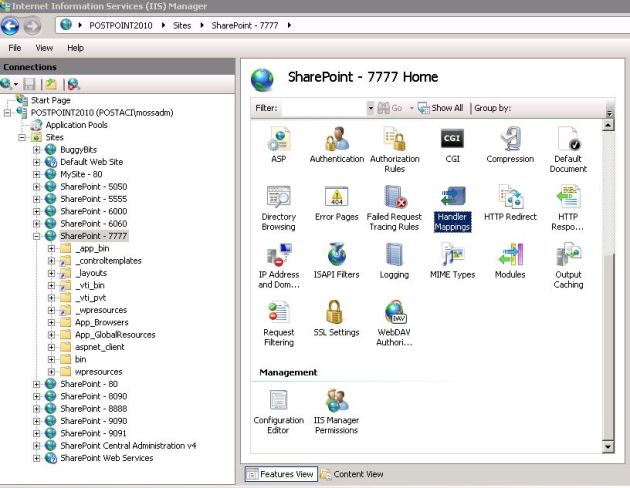
And Remove unneceserry handler mappings by selecting and clicking remove button on iis console.

 The handlers in  picture below are the needed ones so don’t delete them.

So sharepoint is not use any .net framework 4.0 components and the other iis default isapi extentions.
Always make a test that your site is working correctly. For testing use these starting points:

  • Test Pages
  • Test System Pages
  • Test File Upload
  • Test Search
  • Test Sharepoint Designer Connection
  • Add your custom test items.

see you next articles.

WSS3.0 Service Pack 3 and MOSS2007 Service Pack 3 has been released.

For WSS 3.0 Service Pack 3:
http://support.microsoft.com/kb/2526305

For MOSS2007 Service Pack 3:
http://support.microsoft.com/kb/2526299

Installation Order:

Install WSS Service Pack 3
Install MOSS Service Pack 3

Install needed Language service packs:
Install Service Pack 3 for Windows SharePoint Services 3.0 Turkish
Install Service Pack 3 for Windows SharePoint Services 3.0 Arabic

After applying the preceding updates, run the SharePoint Products and Technologies Configuration Wizard or “psconfig –cmd upgrade –inplace b2b -wait” in command line. This needs to be done on every server in the farm with SharePoint installed.

Important! . As you know at same time october CU 2011 has already released. There is some problems upgrade both SP3 and October CU 2011. Microsoft has working on it. So your options now install sp3 or install october CU. Not upgrade together. I will inform you when it is fixed.