Changing Content Database Collation for SharePoint with Supported Way.

The following TechNet Article talks about the SQL Server collation for the SharePoint databases http://technet.microsoft.com/en-us/library/cc288970.aspx#section1

“The SQL Server collation must be configured for case-insensitive. The SQL Server database collation must be configured for case-insensitive, accent-sensitive, Kana-sensitive, and width-sensitive. This is to ensure file name uniqueness consistent with the Windows operating system.”

However, we do not support changing the default collation (Latin1_General_CI_AS_KS_WS) for SharePoint databases to any other collations (CI, AS, KS, WS).

We support any CI collation for the SQL instance (for master, tempdb databases). However we recommend using Latin1_General_CI_AS_KS_WS as the instance default collation (master, tempdb databases).

http://support.microsoft.com/kb/2008668

So  what if you have a different collation and you are in an unspported situation. This article will provide you to change Database Collation to supported  collation of “Latin1_General_CI_AS_KS_WS”

First If you have also different collation for the SQL instance (for master, tempdb databases) and some of other databases which are not SharePoint related will require this you have to setup and install another SQL Server Instance with correct collation . After that you can use database attach method to transfer SharePoint Content Database to new SQL Server. Moving SharePoint Farm to another SQL Server instance is out of this article scope. In this article we talked about only one content database have different collation from supported Latin1_General_CI_AS_KS_WS and assume that for the SQL instance (for master, tempdb databases) you have correct configuration.

You wann check following articles
Setting and Changing the Server Collation
http://technet.microsoft.com/en-us/library/ms179254(v=SQL.100).aspx


1) Don’t Forget to backup your original Content Database for any further problems. and you need a maintenance time to make this operation .For minimize outage you may change the problematic Content Database in “Read Only” Mode. We always suggest to test this in a test enviroment before appling to any Production Farm.

2) Open your SharePoint Central Administration -> Application Management -> Manage Content Databases section.

3) Create an empty new Content Database for  any web Application and deattach this content database after you have created.

For more information about Add a content database (SharePoint Server 2010)
http://technet.microsoft.com/en-us/library/cc825314(v=office.14).aspx

Attach or detach content databases (SharePoint Server 2010) please check following article.
http://technet.microsoft.com/en-us/library/ff628582(v=office.14).aspx

4) Usually SharePoint 2010 creates new content databases with correct collation “Latin1_General_CI_AS_KS_WS” . If not, you need to rebuild another SharePoint Farm or create a content database on another SharePoint server which must be same build level with correct collation than move this content database to your actual farm by using your SQL knowledge.

We are doing this ; because we want to sure that we have a content database with correct Schema.
You can check Collation in SQL Server Management Studio by right clicking on Content Database and selecting “Properties”

pic9

5) Clear all table data in newly created content Database . You can use following script to generate Truncate Tables commands:

Use WSS_Content_New
Declare @TableName as nvarchar(max)
Declare tablecursor cursor for select name from sys.objects where type = ‘U’ order by name
open tablecursor
Fetch next from tablecursor into @TableName
WHILE @@FETCH_STATUS =0
BEGIN
Print ‘Truncate Table ‘ + @TableName
Fetch next from tablecursor into @TableName
END

6) Copy/Paste Generated commands to another SSMS window and run for newly created content database (In example we are using “WSS_Content_New”). If you do it correctly all the data in new content database should be cleared. (Don’t Delete Tables or Don’t try to delete and recreate tables by yourself. We need to clear data in tables only)

7) Click  Start-> All Programs -> Microsoft SQL Server 2008R2 -> “Import and Export Data (32 bit)”

8) Select your SQL Server and Old Content Database as Source

pic1

9) Select new content database as target.

pic2

10) Select “Copy data from one or more tables or views”
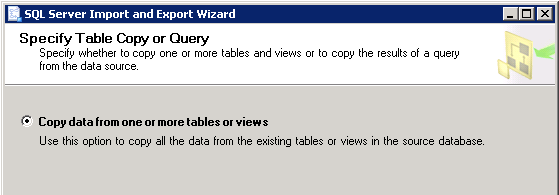
Pic3

11) Select each time for 5 tables until you complete all tables. It will provide you detect copy errors (you will get some.)
Do not select any VIEWS !!! only tables
pic4

12 ) For Each Selected Tables apply following . Mark the tables one by one and click Edit Bindings.

Pic5

13) Select “Delete Rows in destination table” and select “Enable identity insert” . (Dont forget to do this all selected 5 tables)
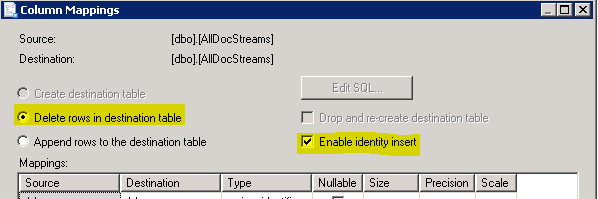
Pic6

14 ) Some of the tables has calculated columns. You need to do some extra operation for tables which contains “Computed Columns” . For Example “AllDocs” Table.
For more information about “Computed Columns” please check following article.
http://msdn.microsoft.com/en-us/library/ms191250(v=SQL.105).aspx

You can find these kind of tables by checking their “create” scripts.
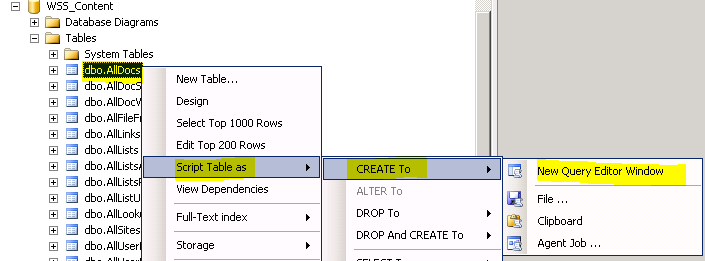
pic8

For example : In AllDocs Table;

CREATE TABLE [dbo].[AllDocs](

[Id] [uniqueidentifier] NOT NULL,

[SiteId] [uniqueidentifier] NOT NULL,

[DirName] [nvarchar](256) NOT NULL,

[LeafName] [nvarchar](128) NOT NULL,

[WebId] [uniqueidentifier] NOT NULL,

[ListId] [uniqueidentifier] NULL,

[DoclibRowId] [int] NULL,

[Type] [tinyint] NOT NULL,

[SortBehavior] [tinyint] NOT NULL,

[Size] [int] NULL,

[ETagVersion]  AS (case when [InternalVersion] IS NULL then NULL else ([InternalVersion]+[BumpVersion]*(256))/(256) end),

[EffectiveVersion]  AS (case when [InternalVersion] IS NULL then NULL else [InternalVersion]+[BumpVersion]*(256) end),

[InternalVersion] [int] NULL,

[BumpVersion] [tinyint] NOT NULL,

[UIVersion] [int] NOT NULL,

[Dirty] [bit] NULL,

[ListDataDirty] [bit] NOT NULL,

[CacheParseId] [uniqueidentifier] NULL,

[DocFlags] [int] NULL,

[ThicketFlag] [bit] NULL,

[CharSet] [int] NULL,

[ProgId] [nvarchar](255) NULL,

[TimeCreated] [datetime] NOT NULL,

[TimeLastModified] [datetime] NOT NULL,

[NextToLastTimeModified] [datetime] NULL,

[MetaInfoTimeLastModified] [datetime] NULL,

[TimeLastWritten] [datetime] NULL,

[DeleteTransactionId] [varbinary](16) NOT NULL,

[SetupPathVersion] [tinyint] NOT NULL,

[SetupPath] [nvarchar](255) NULL,

[SetupPathUser] [nvarchar](255) NULL,

[CheckoutUserId] [int] NULL,

[CheckoutDate] [datetime] NULL,

[CheckoutExpires] [datetime] NULL,

[VersionCreatedSinceSTCheckout] [bit] NOT NULL,

[LTCheckoutUserId]  AS (case when ([DocFlags]&(32))=(32) then [CheckoutUserId]  end),

[VirusVendorID] [int] NULL,

[VirusStatus] [int] NULL,

[VirusInfo] [nvarchar](255) NULL,

[MetaInfo] [dbo].[tCompressedBinary] NULL,

[MetaInfoSize] [int] NULL,

[MetaInfoVersion] [int] NOT NULL,

[UnVersionedMetaInfo] [dbo].[tCompressedBinary] NULL,

[UnVersionedMetaInfoSize] [int] NULL,

[UnVersionedMetaInfoVersion] [int] NULL,

[WelcomePageUrl] [nvarchar](260) NULL,

[WelcomePageParameters] [nvarchar](max) NULL,

[IsCurrentVersion] [bit] NOT NULL,

[Level] [tinyint] NOT NULL,

[CheckinComment] [nvarchar](1023) NULL,

[AuditFlags] [int] NULL,

[InheritAuditFlags] [int] NULL,

[DraftOwnerId] [int] NULL,

[UIVersionString]  AS ((CONVERT([nvarchar],[UIVersion]/(512),0)+’.’)+CONVERT([nvarchar],[UIVersion]%(512),0)),

[ParentId] [uniqueidentifier] NOT NULL,

[HasStream]  AS (case when [Type]=(0) AND ([DocFlags]&(256))=(256) AND [SetupPath] IS NULL OR [SetupPath] IS NOT NULL AND ([DocFlags]&(64))=(64) then (1) else (0) end),

[ScopeId] [uniqueidentifier] NOT NULL,

[BuildDependencySet] [varbinary](max) NULL,

[ParentVersion] [int] NULL,

[ParentVersionString]  AS ((CONVERT([nvarchar],[ParentVersion]/(512),0)+’.’)+CONVERT([nvarchar],[ParentVersion]%(512),0)),

[TransformerId] [uniqueidentifier] NULL,

[ParentLeafName] [nvarchar](128) NULL,

[IsCheckoutToLocal]  AS (case when ([DocFlags]&(512))=(512) then (1) else (0) end),

[CtoOffset] [smallint] NULL,

[Extension]  AS (case when charindex(N’.’,[LeafName] collate Latin1_General_BIN)>(0) then right([LeafName],charindex(N’.’,reverse([LeafName]) collate Latin1_General_BIN)-(1)) else N” end),

[ItemChildCount] [int] NOT NULL,

[FolderChildCount] [int] NOT NULL,

[FileFormatMetaInfo] [varbinary](max) NULL,

[FileFormatMetaInfoSize] [int] NOT NULL,

[FFMConsistent] [bit] NULL,

[ContentVersion] [int] NOT NULL,

[ListSchemaVersion] [int] NULL,

[ClientId] [varbinary](16) NULL,
The Bold Columns are Computed Columns for AllDocs table

  • ETagVersion
  • EffectiveVersion
  • LTCheckoutUserId
  • UIVersionString
  • HasStream
  • ParentVersionString
  • Extension

15) For Every Computed Column for every Table you have to select “Destination” value as “<ignore>”
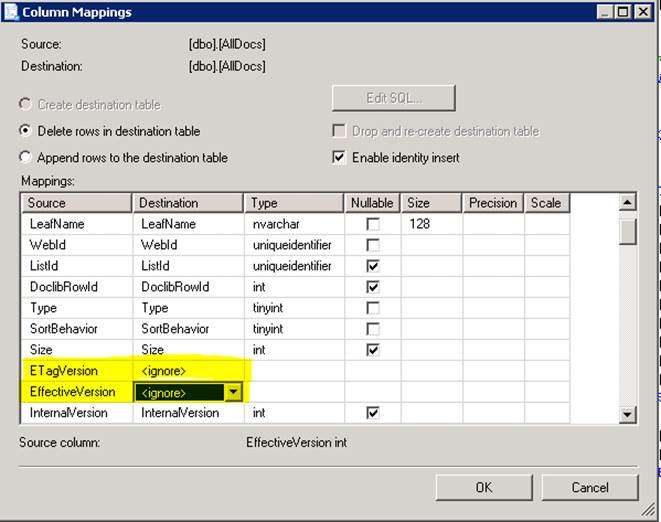
Pic7

16) After Mapping Configuration Click Next and Finish and if everything is ok SQL “Import and Export Tool” able to copy data between selected tables.
Note: It may give some warnings than you can ignore them . But if it is giving any error go back and check all configuration again.
Note: All Rows must me transfered dont forget to check row counts.Any missing row will make your System unstable and unsupported state.

17) Copy all tables’ data to new content database. Check all tables row counts after you finished the operation again.
Important Note:You have to be very Careful,  Any error , any missing row or any missing column data  happens that indicates you could not have a supported database !!!

18) Deattach original content database from Web Application
19) Attached newly created content database to Web Application and test that everything is working fine.
Attach or detach content databases (SharePoint Server 2010) please check following article.
http://technet.microsoft.com/en-us/library/ff628582(v=office.14).aspx


Important Note: The data have already been transfered from old database will not be changed. Thats mean until this operation old data will remain in old collation. New added Data will applied as the new collation format. So dont expect that the if you have some character problems causing by unsupported collation will not be fixed by this operation. And Always test your System  for a test environment before doing any action on Production.

To being on the safe side you may try create one more  content database and after you complete change collaction operation , and move your all site collections  by Move-SPSite Command.
http://technet.microsoft.com/en-us/library/ff607915.aspx


Getting Last Accessed user for a SharePoint Site

Assume that you would like to get last accessed users for a specific site or web in SharePoint. The correct approch is creating a custom IIS Module to get update statistics by every request. If you dont want to do that there you may alternatively use following method.

But we have some conditions:
1) Usage and Health Data Collection Service Application is running.
2) And Microsoft SharePoint Foundation Usage Data Import job running in a small interval (one hour maybe). (Because the data first stores in a Usage file in file System and when the timer job has been executed that data transfered to you Logging Database) Thats mean it is not real time. (If you would like a statistics in real time i suggest that use a custom IIS module)

Than you can search the last 5 accessed user from SQL Server Management Studio by quering Logging Database Server (It would be delayed by interval of Import Timer Job)

Declare @serUrl as nvarchar(MAX), @sitUrl as nvarchar(MAX) , @wUrl as nvarchar(MAX)
Declare webcursor CURSOR FOR select serverurl,siteurl,weburl from RequestUsage group by ServerUrl,SiteUrl,WebUrl
Open webcursor

FETCH NEXT FROM webcursor INTO @serUrl,@sitUrl,@wUrl
WHILE @@FETCH_STATUS = 0 
BEGIN
PRint 'ServerUrl: ' + @serUrl + ' Site Url:' + @sitUrl +  ' Web Url:' + @wUrl
select Top 5 LogTime, UserLogin,ServerUrl,SiteUrl,WebUrl from RequestUsage 
where ServerUrl = @serUrl and SiteUrl = @sitUrl and WebUrl =  @wUrl
--Dont Forget to Exclude SharePoint\system , Central Administration Web Site, Crawler Account, And Timer Service Account for correct results.
and ServerUrl <> 'http://contoso.com:32843'  and UserLogin <> 'SHAREPOINT\system' and UserLogin<> 'Contoso\Crawler'
order by LogTime desc 
FETCH NEXT FROM webcursor INTO @serUrl,@sitUrl,@wUrl
END
CLOSE webcursor
DEALLOCATE webcursor

Stop SharePoint Completely or stopping the farm

For Wss 3.0:

Stop the farm by following these steps:

1. in the Services snap-in, stop the following services:

  • Windows SharePoint Services Administration service
  • Windows SharePoint Services Search service
  • Windows SharePoint Services Timer service
  • Windows SharePoint Services Tracing service
  • Windows SharePoint Services VSS Writer service

2.    at the command prompt, type iisreset /stop.

Do it for all SharePoint installed servers in your farm.
http://technet.microsoft.com/en-us/library/cc512723(v=office.12).aspx

For Moss 2007

Stop the farm by following these steps:

1.  in the Services snap-in, stop the following services:

  • Microsoft Single Sign-On service
  • Office Document Conversions Launcher service
  • Office Document Conversions Load Balancer service
  • Office SharePoint Server Search service
  • Windows SharePoint Services Administration service
  • Windows SharePoint Services Search service
  • Windows SharePoint Services Timer service
  • Windows SharePoint Services Tracing service
  • Windows SharePoint Services VSS Writer service

2. On the server that is running the Central Administration Web site, at the command prompt, type iisreset /stop.
Do it for all SharePoint installed servers in your farm.
http://technet.microsoft.com/en-us/library/cc512725(v=office.12).aspx

For SharePoint Foundation 2010

1. in the Services snap-in, stop the following services:

  • SharePoint 2010 Administration
  • SharePoint 2010 Timer
  • SharePoint 2010 Tracing
  • SharePoint 2010 User Code Host
  • SharePoint 2010 VSS Writer
  • SharePoint Foundation Search V4
  • SharePoint Server Search v4
  • World Wide Web Publishing Service

2. at the command prompt, type iisreset /stop.
Do it for all SharePoint installed servers in your farm.
http://technet.microsoft.com/en-us/library/cc512723(v=office.14).aspx

For SharePoint Server 2010

1.  in the Services snap-in, stop the following services:

  • SharePoint 2010 Administration
  • SharePoint 2010 Timer
  • SharePoint 2010 Tracing
  • SharePoint 2010 User Code Host
  • SharePoint 2010 VSS Writer
  • SharePoint Foundation Search V4
  • World Wide Web Publishing Service
  • SharePoint Server Search 14
  • Web Analytics Data Processing Service
  • Web Analytics Web Service

Not:  The final two services are part of the Web Analytics service application. If you are running the Web Analytics service application and choose to rename your server, you must also reconfigure the Web Analytics database locations. For details, see To reconfigure Web Analytics database locations .

2. On the server at the command prompt, type iisreset /stop.
Do it for all SharePoint installed servers in your farm.
http://technet.microsoft.com/en-us/library/cc512725(v=office.14).aspx

For SharePoint 2013

1. in the Services snap-in, stop the following services:

  • SharePoint 2013 Administration
  • SharePoint 2013 Timer
  • SharePoint 2013 Tracing
  • SharePoint 2013 User Code Host
  • SharePoint 2013 VSS Writer
  • World Wide Web Publishing Service
  • SharePoint Server Search

2. On the server that is running the SharePoint Central Administration website, at a command prompt, type iisreset /stop.
Do it for all SharePoint installed servers in your farm
http://technet.microsoft.com/en-us/library/cc512725(v=office.15).aspx

SharePoint Word Count with Rich Text Editor

This could only be achieved via custom development and is not possible by using SharePoint’s out
of the box features or setup options  this following blog where a word count is achieved with JavaScript:
https://www.nothingbutsharepoint.com/sites/eusp/Pages/add-character-or-word-count-to-sharepoint-multi-line-plain-text-field-and-restrict-input-length.aspx

But there is also an exception , it is only working for a Input element.

Rich Text Box are different than normal text box

<TD vAlign=top width=190 noWrap>
<H3><NOBR>RichText</NOBR> </H3></TD>
<TD vAlign=top RteRedirect=”[Control Chain]_TextField_inplacerte”><!– FieldName=”RichText”
FieldInternalName=”RichText”
FieldType=”SPFieldNote”
–><SPAN>
<DIV>
<DIV style=”DISPLAY: none” id=[Control Chain]_TextField_inplacerte_label>Rich text editor</DIV>
<DIV aria-haspopup=true style=”MIN-HEIGHT: 84px” id=[Control Chain]_TextField_inplacerte role=textbox aria-labelledby=[Control Chain]_TextField_inplacerte_label contentEditable=true InputFieldId=”[Control Chain]_TextField_spSave” UseInlineStyle=”True” aria-autocomplete=”both” aria-multiline=”true”>
<P>​</P></DIV>
<DIV style=”CLEAR: both”></DIV></DIV>
<SPAN dir=ltr><INPUT id= [Control Chain]_TextField_spSave name=[Control Chain]TextField_spSave type=hidden> </SPAN></SPAN></TD>

Text Area :
<TR><TD vAlign=top width=190 noWrap>
<H3><NOBR>RichText</NOBR> </H3></TD>
<TD vAlign=top><!– FieldName=”RichText”
FieldInternalName=”RichText”
FieldType=”SPFieldNote”
<SPAN><TEXTAREA id=”[Control_Chain]_TextField title=RichText cols=20 rows=6 name=””></TEXTAREA>
<BR></SPAN></TD></TR>

SharePoint 2010 has using also div based RTE so javascript codes based on above artilce can be adjust like that;

<script src="<your jquery path and version>/jquery-1.3.2.min.js" type="text/javascript"></script>
<script type="text/javascript">
$('div[role*="textbox"]').bind('keyup blur',function(e){
 var thisLength = $(this).text().length;
if(true && thisLength>0){
thisLength = $(this).text().split(/[' '|\n]/).length;
}

if(true && 200>0){

if(thisLength>(200-5)){
$("#myCustomCounter_").css({'background-color':'#FF0000','font-weight':'bold','color':'white'});
}else if(thisLength>(200-10)){
$("#myCustomCounter_").css({'background-color':'#FF6600','font-weight':'bold','color':'white'});
}else{
$("#myCustomCounter_").css({'background-color':'transparent','font-weight':'normal','color':'black'});
}

}

if(200>0){
if(true){
while(thisLength>200){
currVal = $(this).text();
$(this).val(currVal.substring(0,currVal.lastIndexOf(' ')));
thisLength--;
}
}else{
if(thisLength>200){
currVal = $(this).text();
$(this).val(currVal.substring(0,200));
}
}
thisLength = (200-thisLength<0)?0:200-thisLength;
}

$("#myCustomCounter_").html("Remaining words asda: "+thisLength);
}).parents('td:first').append("<span id='myCustomCounter_' style='padding:2;'></span>").find('input[name*="TextField_spSave"]');

​</script>

Prevent caching for specific files in SharePoint

Assume following scenario that you have a SharePoint environment and all cachings are enabled . Caching is very efficent for documents which are not change frequently . What if you have dynamically and frequently changing xml,js,txt or a css file . so how could you provide to bypass only needed files are not being cached and other leave other same type files be cached.

There is an ASP.NET trick for this purpose. Assume that we have a menu.xml and this file is updating by some Operations on server and this operation happens very frequently. But your clients could not get updated file until they completely clear their browser caches. You dont want to be prevent every xml files to be not cached .
Basically caching machanizms has deciding to cache files by checking url syntax. If you have change the url somehow you can prevent the cache. We usually provide this by adding a fake version query string like menu.xml?ver=1 at the end of the url . and increasing this parameter when ever we changed the file. For some examples you can aslo use GUIDs for this.

1)Create a test.js file and type following codes. You may also integrate this to your own page directly.

function CreateDigits() {
return (((1 + Math.random()) * 0x10000) | 0).toString(16).substring(1); }
function createGuid() {     return (CreateDigits() + CreateDigits() + “-” + CreateDigits() + “-4” + CreateDigits().substr(0, 3) + “-” + CreateDigits() + “-” + CreateDigits() + CreateDigits() + CreateDigits()).toLowerCase(); } //alert(createGuid());

$.get(‘/_layouts/menuxml/menu.xml’ + ‘?ver=’ + createGuid() , function (data) {     //do operations.     alert(‘Load was performed.’); });

2) Add test.js to your masterpage
<script type=”text/javescript” src=”/_layouts/test.js” ></script>

3) Use IE developer Panel (F12) or  Firefox Firebug plugin or Fiddler2 program on your client  check that menu2.xml is loading when you request the file.

You should see the menu.xml file request has contain ?ver=<GUID> notation.

4) Update your Javascript files where loading  XML file according to example.

5) And test the change xml file and check still browsers caching the file

What we basically do ?

Following codes has creates a GUID function CreateDigits() While we requesting the xml file we adding end of the url of the file this GUID as a parameter for every request it will creates another guid. Like http://<site>/_layouts/menuxml/menu.xml?ver=bca7f319-5627-4d22-48f6-4c3e59285199

So it will provide that every request on client is unique and force the clients update XML file for every time. This is the basic logic you can develop yours based on this.

Resources:
http://guid.us/GUID/JavaScript