Import ULS log files to SQL Server database for Sharepoint 2010

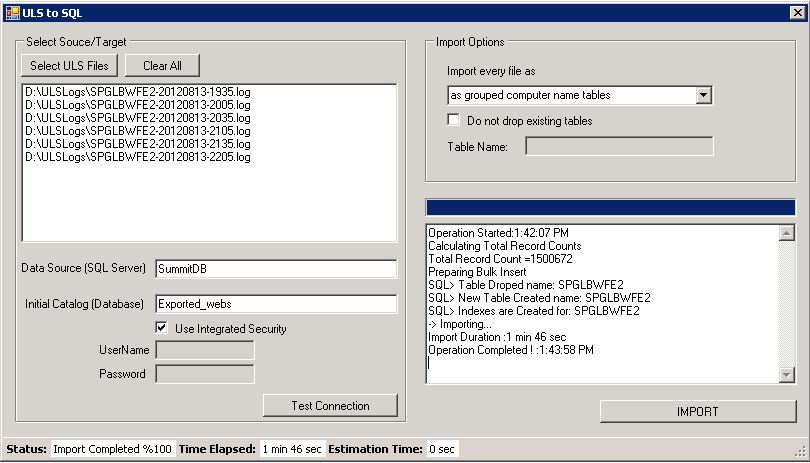
Sometime you may need to import ULS log files to SQL server . It can be done with several ways by using SQL Server import tools or import from an Excel file to SQL  server. Or you can use fallowing free open source windows application tool. With this tool it can be done with more quickly . By multy-threading and bulk insert architecture feature provides you that ULS logs contains total 1.500.000 row  can be upload in  apprx. 2 minutes. (as you know it depends on your configuration and hardware)

Than you can query SQL tables as you wish : Fallowing query will return execution time over 1 sec for SPMonitoring event records.

select * from WFE1
where [ExecutionTime] > 1000 and [Eventid] =’b4ly’
order by [ExecutionTime] desc

“All These source codes are freeware and is provided on an “as is” basis without warranties of any kind, whether express or implied, including without limitation warranties that the code is free of defect, fit for a particular purpose or non-infringing. The entire risk as to the quality and performance of the code is with the end user

For Download  ULStoSQLImporter v1.0  for Sharepoint 2010:
http://spstools.codeplex.com/releases/view/93135

SharePoint 2010 Configuration Database has a huge LOG File size problem.

You detected that SharePoint 2010 configuration database has a big LOG file size and you have  a low disk space problem.

This is happening because SharePoint Configuration Database are set to full recovery mode by default. Full recovery mode does not auto shrink / truncate the log files on a full backup. In this mode System Admins are responsible to maintaining getting Transactional Log Backups and Shrinking Log files. If Simple recovery mode is selected when you get a full backup the log files will be shrinked. But Microsoft does not recommend changing to simple recovery mode in a production environment.

You can check the Recovery mode by using SQL Server Management Studio (SSMS) by selecting “SharePoint Config” database (Right Click)-> Properties -> Options.

Full recovery mode allows the SQL admins to backup the transcation logs incrementally, simple recovery mode does not allow this and only allows full or differential backups, no transaction log backups. And Full Recorvery mode has provide you to recovery at specific time manner.

For more information about SQL Server Recovery Models
http://msdn.microsoft.com/en-us/library/ms189275.aspx

SharePoint Configuration Database is the heart of a SharePoint farm and according to size of farm lots of transactions happens.Especially every Timer Job run can cause high transactions on SharePoint Configuration Database. And There are nothing to prevent or reduce this logs rate by making any changes on SharePoint Side.

So for production enviroments SQL Admin should make a recovery and maintenance plans for preventing unnecessary growth of log files. It should be done by getting frequently Transactional Log backups and shrinking transaction log files.

The frequency has changed  system by system. It could be done 30 min to 1 day frequency, according to your transaction log growth.To prevent this kind of problem, make automize or manuelly get your Transactional backups and shrink the log files for a defined period.

For Backup Transaction Log Please check fallowing artcile:
http://msdn.microsoft.com/en-us/library/ms179478.aspx

For Shrink Transaction Log file:
http://msdn.microsoft.com/en-us/library/ms190757.aspx

Which version of SharePoint supports Microsoft SQL Server 2012

Only SharePoint 2010 SP1 (14.0.6029) and higher versions supports Microsoft SQL Server 2012 . Currently for MOSS2007 or WSS3.0 is not supported.
http://support.microsoft.com/kb/2460045

Recursive Triggers on SQL Server and User Profile Service Problem

Recently Microsoft has published a “FAST PUBLISH” article about User Profile Application service starting problem with FIM Syncronization service.In KB defined problem is caused by The ‘Recursive Triggers Enabled’ property for the Model database is set to ‘True’ in the SQL instance. And the error is in your application log

The server encountered an unexpected error and stopped.
“ERR: MMS(6016): sql.cpp(5580): Query (update [mms_run_history] set [is_run_complete] = 1,[run_result] = N’stopped-server’,[end_date] = <Date & Time> where ([is_run_complete] = 0)) performed with error
ERR: MMS(6016): sql.cpp(5633): Maximum stored procedure, function, trigger, or view nesting level exceeded (limit 32).
….

What is a Recursive Triggers ?
A requirsive trigger is a trigger that fired by the other triggers or intreacting object that fire the trigger when executed recursively.

SQL Server also allows for recursive invocation of triggers when the RECURSIVE_TRIGGERS setting is enabled using ALTER DATABASE.

Recursive triggers enable the following types of recursion to occur:

  • Indirect recursion
    With indirect recursion, an application updates table T1. This fires trigger TR1, updating table T2. In this scenario, trigger T2 then fires and updates table T1.
  • Direct recursion
    With direct recursion, the application updates table T1. This fires trigger TR1, updating table T1. Because table T1 was updated, trigger TR1 fires again, and so on.

The following example uses both indirect and direct trigger recursion Assume that two update triggers, TR1 and TR2, are defined on table T1. Trigger TR1 updates table T1 recursively. An UPDATE statement executes each TR1 and TR2 one time. Additionally, the execution of TR1 triggers the execution of TR1 (recursively) and TR2. The inserted and deleted tables for a specific trigger contain rows that correspond only to the UPDATE statement that invoked the trigger.

Note:The previous behavior occurs only if the RECURSIVE_TRIGGERS setting is enabled by using ALTER DATABASE. There is no defined order in which multiple triggers defined for a specific event are executed. Each trigger should be self-contained.

Disabling the RECURSIVE_TRIGGERS setting only prevents direct recursions. To disable indirect recursion also, set the nested triggers server option to 0 by using sp_configure.

If any one of the triggers performs a ROLLBACK TRANSACTION, regardless of the nesting level, no more triggers are executed.

How to change “Recursive Triggers Enabled” property to false ?

From the SQL Server Management Studio, expand ‘System Databases’ > Right-click ‘Model’ | Properties | Options | under Miscellaneous section, set ‘Recursive Triggers Enabled’ property to ‘False’.

or.

The recursive trigger setting works on a database level . For checking the status of the recursive setting, use this command:

 EXEC sp_dboption '<name of db>', 'recursive triggers' -

for enabling Recusive Triggers:

 EXEC sp_dboption '<name of db>', 'recursive triggers', 'true' 

for disabling Recursive Triggers:

 EXEC sp_dboption '<name of db>', 'recursive triggers', 'false' 

For our senario use like this:

EXEC sp_dboption 'Model', 'recursive triggers', 'false' 

Resources:
http://msdn.microsoft.com/en-us/library/ms189799.aspx
http://support.microsoft.com/kb/2579951


Can not Enable RBS because of SQL server collation for Sharepoint 2010

Note: This is article contains possibility of one reason for this error.You can able to get this error other unrelated situations.)

When you try to enable after complete installation of RBS in sharepoint powershell console you getting belowed error:

Exception calling “Enable” with “0” argument(s): “Must declare the scalar variable “@RBsId”.”
At line:1 char:13

First you think like me should i missing a parameter ? Answer NO! You are not! this fuction is parameterless.But whats happing ? I reflect the dlls and find out SPContentDatabase.RemoteBlobSettings.Enable() function call stored procedure of “dbo.proc_EnableRbs” in selected content database.And this stored procedure using @RBsId as internal parameter.

Can not enable RBS Error

Can not enable RBS Error

After working one day and countless install/uninstall attempt finally we found the problem is SQL Server Collation set “TURKISH_CI_AS” .And sharepoint 2010 has limitation with SQL collation .

You get more information form here:
http://support.microsoft.com/kb/2008668

Changing the server collation to Latin1_General_CI_AS_KS_WS fixes the issue .

In this moment you have two option as hardway you can try to rebuild master tables with correct collation and alter all content databases or as easy way you can reinstall SQL Server  with corrent collation.