Clearing or removing a key&value from SPWeb.Properties (Tips&Tricks)

this quick trick can be use for removing a property correctly form SPWeb object.

string key="Identifier";
if (!web.Properties.ContainsKey(key))
{
return; //make a check is already exists.
}
web.AllProperties.Remove(key); //first clear from AllProperties.
web.Properties[key] = null; // remove property value
web.Update(); //update web object.
web.Properties.Update(); // update properties object.

See you in next tips…

Could we create a second User Profile Service Application ?

Yes you can but ,
If you have only one server in your farm you can use just one User Profile Service Application (UPA) in this server because the windows Service of User Profile Syncronization Service just configurable only one UPA. So if you have more than one sharepoint server in your farm for example 3 server;  you can create more than 3 UPA but you can only syncronize 3 of them.

For Another scenario, i assume that you have only one server and already provisioned one UPA and configured the syncronization connection. After adding second UPA as you know you can not able to add any Sycronization connection for Second UPA . But if you stop CA-> Services On Server -> User Profile Syncronization Service and restart it will prompt you to select UPA options mean you can change the relation for specific UPA . Still only one UPA can able to sync for one server.

Excel Service can not display workbooks in Sharepoint 2010

Hi Everybody,

I have recently faced for a strange issue about displaying excel workbooks on Sharepoint 2010 .
When i checked the uls logs we have multiple exceptions like.

Stack trace: onetutil.dll: (unresolved symbol, module offset=00000000000A1A7D)
at 0x000007FEEFD71A7D onetutil.dll: (unresolved symbol, module offset=00000000000A2C3D)
at 0x000007FEEFD72C3D owssvr.dll: (unresolved symbol, module offset=0000000000008FA2)
at 0x000007FEE9A58FA2 owssvr.dll: (unresolved symbol, module offset=0000000000048C74)
at 0x000007FEE9A98C74 mscorwks.dll: (unresolved symbol, module offset=00000000002BF6D7)
at 0x000007FEF365F6D7 Microsoft.SharePoint.Library.ni.dll: (unresolved symbol, module offset=00000000000EC86B)
at 0x000007FEEB45C86B Microsoft.SharePoint.ni.dll: (unresolved symbol, module offset=0000000001AB6942)
at 0x000007FEED476942 Microsoft.SharePoint.ni.dll: (unresolved symbol, module offset=0000000001A7ADED)
at 0x000007FEED43ADED Microsoft.SharePoint.ni.dll: (unresolved symbol, module offset=0000000001A7CF66)
at 0x000007FEED43CF66 Microsoft.SharePoint.ni.dll: (unresolved symbol, module offset=0000000001A7FA31)
at 0x000007FEED43FA31

An internal error occurred.
at Microsoft.Office.Excel.WebUI.ExcelWebRendererControl.InternalPreRender()
at Microsoft.Office.Excel.WebUI.Utils.ExecuteWebEventHandler(CoreWebEventHandler coreWebEventHandler, CoreWebEventHandler baseClassHandler, Object param, IMainControl mainControl)

Utils.ExecuteWebEventHandler: unexpected exception System.NullReferenceException: Object reference not set to an instance of an object.
at Microsoft.Office.Excel.WebUI.ExcelWebRendererControl.InternalPreRender()
at Microsoft.Office.Excel.WebUI.Utils.ExecuteWebEventHandler(CoreWebEventHandler coreWebEventHandler, CoreWebEventHandler baseClassHandler, Object param, IMainControl mainControl)

Watson bucket parameters: SharePoint Server 2010, ULSException14, 5f9be61a “excel services application”, 0e00178d “14.0.6029.0”, 13ed43ce “microsoft.office.excel.webui.internal”, 0e00178b “14.0.6027.0”, 4da5bd73 “wed apr 13 18:12:51 2011”, 000009ca “000009ca”, 000000e9 “000000e9”, 4a6d3421 “nullreferenceexception”, 62646b69 “bdki”
The file that i want to open have url like http://blog.bugrapostaci.com:80/_layouts/xlviewer.aspx?id=/Shared%20Documents/CaseTest.xsls
But  the important one is in logs   in this correlation that unrelated information log not the exceptions. This info is about :
“There is no Web named “/SiteDirectory/BlogContent/Lists/Categories/AllCategories.aspx”. in first i ignored it quickly. Than i realized that article:

Excel Calculation Service cannot display workbooks if no root site collection is created for a web application.
http://support.microsoft.com/kb/2596582

The sharepoint version which i was working on it is before Oct 2011 CU . The Solution is simple install at least Oct 2011 CU for fixing these errors.

How to delete the Default SSP in SharePoint 2007

There is no way to delete default SSP from Sharepoint Central Administration site via using this gui.
So stsadm command has help us for removing Default SSP

1) Open a command prompt
2)change your path to drive:\program files\common files\microsoft shared\web server extentions\12\BIN
3) Run fallowing command:
stsadm -o deletessp -title SharedServices1 -force

Have a nice Tips&Tricks

Sharepoint 2010 Character problem in Category Titles in Blog Site for different languages

Hello Everyone,

If you faced a character problem in Category Titles in Blog Site Template for different language , may be this article helps you. In my envoriment i am using Turkish Language Pack (1055) .
the repro is not tested on other languages but it  should be occurs for other languages which is contains specific characters .

I think this  problem is a minor bug .You can reproduce it easily .

Here the Repro steps.
1) Install or find SPS2010 + SP1Dec2011 CU + TR(1055) language pack installed machine.
2) Create a site collection in Turkish
3) Create a “Web Günlüğü”  (Blog Site Instance)
4) Add some categories that contains Turkish Characters.
5) Click one of this category titles in left navigation  and open category page

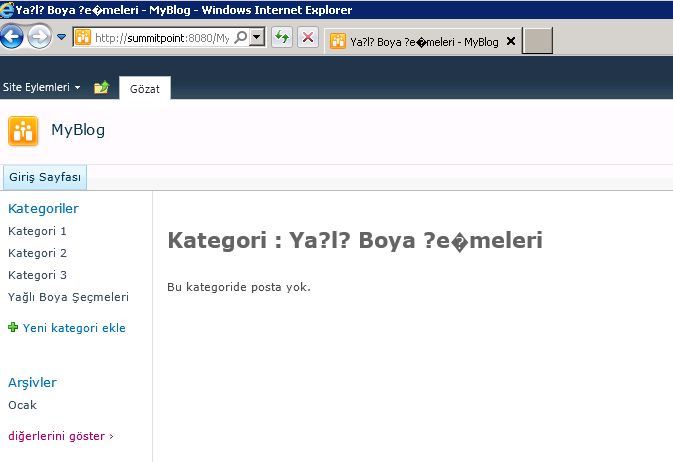
I have created a category named : “Yağlı Boya Seçmeleri”  You can see the problem bellowed screenshot.

The problem is when rendering left panel Categories web part (XSTLListView) not encode url of Link object correctly. I have tested with changing the link in browser’s address bar with correct encoding the titiles shown correctly on category page.

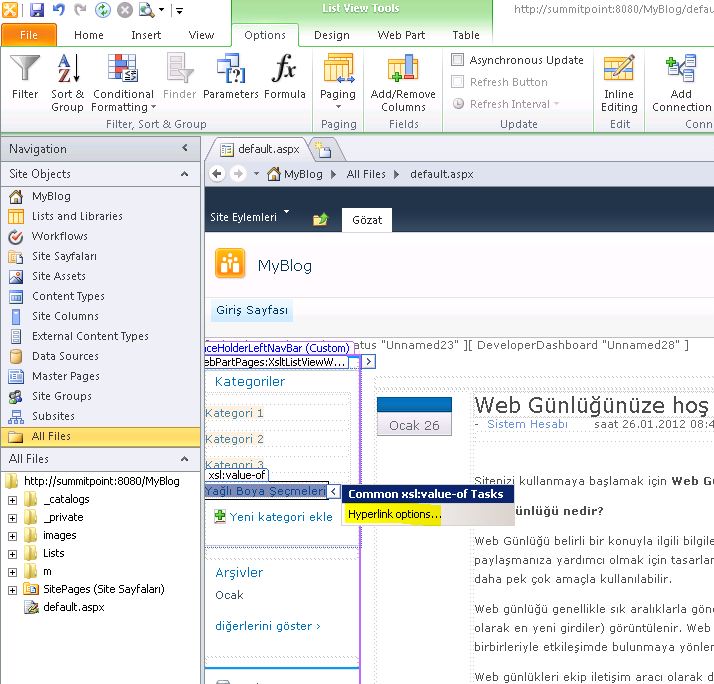
So There  is a workaround for fixing this issue with using Sharepoint Designer 2010 .

1) Open defauılt aspx and (any needed page) in Sharepoint Designer.

2) Select one of the link  in Categories  XsltListViewWebpart


3) Click the HyperLinkOptions button.

4) Change the default value of
{$HttpVDir}/{$thisNode/../@resource.wss.lists_Folder}/{$thisNode/../@resource.wss.blogcategories_Folder}/Category.aspx?CategoryId={$thisNode/@ID}&Name={$CategoryTitle} as
{$HttpVDir}/{$thisNode/../@resource.wss.lists_Folder}/{$thisNode/../@resource.wss.blogcategories_Folder}/Category.aspx?CategoryId={$thisNode/@ID}&Name={$thisNode/@Title}

5) Repeat same options for all needed pages.

And Open and Check  again your blog page :

(For who know Turkish the word of “Şeçme” have a little typo correct word is “Seçme” . Dont worry about it . i am not get all screenshot again for fixing this 🙂

See you next article.