MOSS 2007 SP2 and WSS3.0 SP2 Support has ended

According to MS Product Life Cycle , Microsoft Office SharePoint Server (MOSS) Service Pack 2 and Windows SharePoint Service (WSS) SP2   supports has ended yesterday.If you do not upgrade your MOSS 2007 and WSS 3 server to SP3 level than you may not get fully support from Microsoft Support.
the minimal supported version is WSS 3.0 SP3 and MOSS SP3
http://support.microsoft.com/lifecycle/default.aspx?LN=en-us&p1=14414&x=11&y=11
http://support.microsoft.com/lifecycle/default.aspx?LN=en-gb&p1=12200&x=11&y=6

Sharepoint 2007/2010 October CU 2012 has released.

WSS V3 and MOSS 2007 October 2012 CU:
http://blogs.msdn.com/b/joerg_sinemus/archive/2012/11/12/wss-and-moss-october-2012-cu.aspx
http://blogs.technet.com/b/stefan_gossner/archive/2012/11/08/october-2012-cu-for-sharepoint-2007-has-been-released.aspx

MSF2010 and SPS2010 October 2012 CU:
http://blogs.msdn.com/b/joerg_sinemus/archive/2012/11/15/sharepoint-2010-and-october-2012-cu.aspx
http://blogs.technet.com/b/stefan_gossner/archive/2012/11/15/october-2012-cu-for-sharepoint-2010-has-been-released.aspx


Istanbul Sharepoint Summit 2011

Hello Everyone,

Istanbul Sharepoint Summit 2011 is starting at 6th of December .I will introduce 300 level “Developing and Managing SharePoint Solutions with Visual Studio ” session:

Want to know how to best take advantage of Visual Studio 2010’s built in support for SharePoint?  In this demo heavy session we will explore Visual Studio 2010’s tightly integrated SharePoint development tools.  You will see Visual Studio’s built in support for creating the most common customizations including custom web parts, event receivers, Workflows and more.  We will also see how Visual Studio’s ALM capabilities available in Visual Studio Ultimate and Team Foundation Server can be applied when working with SharePoint.

For more information about event please visit :
http://www.sharepointsummitistanbul.com/en/Pages/default.aspx

See you in the event 🙂

Problem with Security Update for Windows SharePoint Services 2007 (KB2493987), 64-bit Edition

After  kb2493987 installed unable to connect sharepoint sites getting error Service Unavailable.
Unable to run IIS application pools getting error.

Application pools stop when a request arrives with the following error in the system logs:
A process serving application pool terminated unexpectedly process exit code was 0xffffffff
Checked the IIS file versions and there are a lot of DLLs do not match SP2 version.
I have asked customer to re-install SP2 and it solved the issue.

After IIS working correctly this time sharepoint site getting error of  404 not found error.
First check DisableLoopbackCheck issue.

Don’t forget when a security updates patched  need to run configuration wizard until not to do so.

CAUSE
===================
kb2493987 Automatically instaled windows update.

SOLUTION
====================
net stop MSSQL$MICROSOFT##SSEE
net start MSSQL$MICROSOFT##SSEE
psconfig -cmd upgrade -inplace b2b -wait -force

For More Information:
http://support.microsoft.com/kb/2493987
http://blogs.technet.com/b/sbs/archive/2010/06/18/companyweb-and-sharepoint-central-admin-not-accessible-after-installing-kb983444.aspx
http://support.microsoft.com/kb/944267

Getting Process Monitor logs for MS Support services

 In this article i descibe how to get process monitor log for sending Microsoft Support Services .

1)      Download Process Monitor from this link and install it on your Client Machine.
http://technet.microsoft.com/en-us/sysinternals/bb896645

2)      Run Process Monitor. Please  dont define any filter. And select red rectangled options on screenshoot.

3)      Quickly reproduce the error or the issue as fast as possible.

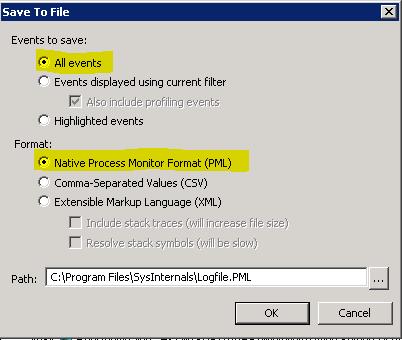
4)      After that for saving please select File->Save and open save dialog window
Select “All events”
And for Format select “Native Process Monitor Format (PML)

5)      Upload the log files

NOTE: If you need to transfer these files to Microsoft File Services , please compress files in zip file. If zip file size is bigger than  5GB please spearate multiple files that lower than 5GB.