Sharepoint 2010 Publishing Portal and missing Search Center template

Hi everybody, last day one of my friend called me and asked ” i provision a Publishing portal template but i couldn’t found Search Center Templates do you know where are they?” If you encounter with this situation Dont panic they are already there but  in sharepoint 2010 when provisioning Publishing Portal and Enterprise Wiki templates other templates administratively disabled by default .You can activate them  from Site Actions->Site Settings -> (Look and Feel) Page layouts and site templates

Happy tips & tricks

Sharepoint Log management with ULS Viewer

Hi Everybody ,

Sharepoint logs is one of the important point for developers . When an error occures you may want to examine sharepoint logs in drive:\Program Files\Common Files\Microsoft Shared\Web Server Extentions\[12,14]\Logs.These log files are text based and sometimes its make me creazy for searching related data .Because its hard to find some thing in these texts files. There are some tools for easily manage your logs.

What is ULS Viewer:

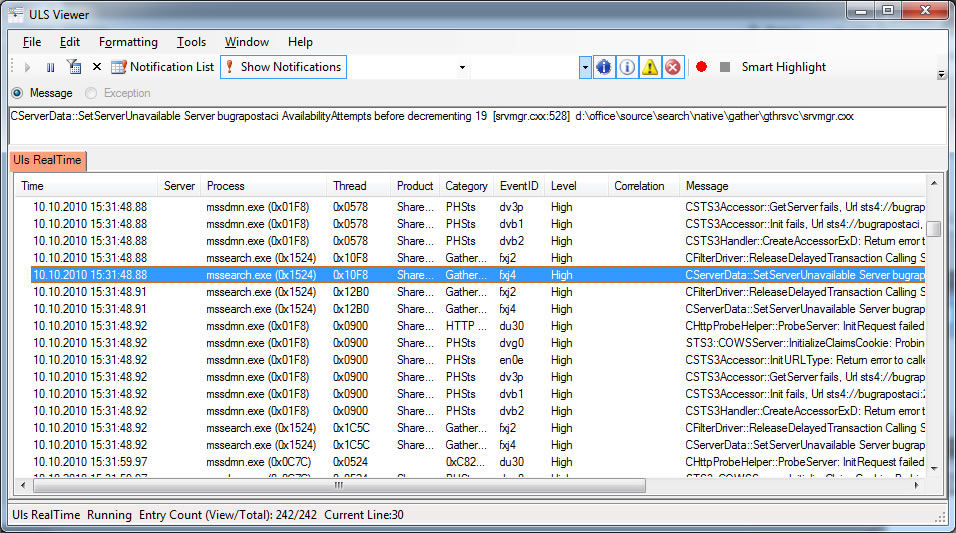
ULSViewer allows users to open a ULS log file and display its contents in a user friendly format. Users can then perform advanced functions such as filtering, sorting, highlighting, loading logs, appending logs, etc in order to single out the data that is important to the user. This information can be used to diagnose problems with machines running ULS services, or to monitor machines and the events they create in realtime.

Toggle Correlation Tree and Notification features are most i like.In SharePoint 2010 has come with new error handling feature named  “correlation id”  which is help us to trace a series of event inside SharePoint.

Download: http://code.msdn.microsoft.com/ULSViewer/Release/ProjectReleases.aspx?ReleaseId=3308

ULS Viewer for sharepoint:


Sharepoint 2010 with Microsoft Distributed Cache (Velocity)

Microsoft Distributed Cache “Velocity”  provides a highly scalable in-memory application cache for all kinds of data. By using cache, your application performance can improve significantly by avoiding unnecessary calls to the data source. You know for sharepoint farms caching and session management is one of challenging issue. Sharepoint farms have many servers as application servers, web front end (WFE) servers etc. And using Network  load balancing (NLB) services for efficiency. By default your caches are server specfic and you can not  use cached data by other WFE  servers except which one of them has cached the data.

Velocity offers a custom state provider for your ASP.NET Web applications. This lets Web applications spread  objects across the cache cluster, providing scalability. Due to the nature of “Velocity,” objects that you put in  must be serializable.

Alternatively you can use SQL Server for SessionState but this solution has some disadvantages.For example performance and high availability are the key points.

  • InProc – Fastest, but the more session data, the more memory is consumed on the web server, and that can affect performance.
  • StateServer – When storing data of basic types (e.g. string, integer, etc), in one test environment it’s 15% slower than InProc. However, the cost of serialization/deserialization can affect performance if you’re storing lots of objects. You have to do performance testing for your own scenario.
  • SQLServer – When storing data of basic types (e.g. string, integer, etc), in one test environment it’s 25% slower than InProc. Same warning about serialization as in StateServer.

You can also use 3rd party distributed caches that Memcached , ScaleOut, NCache,SharedCache some options .

Some advantages of Velocity:

  • Scalebility: Velocity provides a cache cluster with multiple hosts and spread cache data between hosts.You can add more servers to the cache cluster.
  • High Availablity:The high availability feature in Microsoft project code named “Velocity” supports continuous availability of your cached data by storing copies of that data on separate cache hosts. When you have high availability enabled on a multi-server cluster, your application can still retrieve its cached data if a cache server fails
  • Cache Notifications:Microsoft project code named “Velocity” offers cache notifications that allow your applications to receive asynchronous notifications when a variety of cache operations occur on the cache cluster. Cache notifications also provide automatic invalidation of locally cached objects
  • Concurrency Models :To help your application deal with concurrency issues, “Velocity” supports optimistic and pessimistic concurrency models
  • SessionState Provider: you can share sessions across multiple sites. You can now host your application in multiple sites and have users visit one location to another without losing their sessions.

About Performance of Velocity :
MSDN Magazine Article about Velocity says “Simply put, if accessing the cache is not faster than accessing your database, there is no need to have it. Having said that, what should you expect in terms of performance from a good distributed cache?

The first thing to remember is that a distributed cache is usually OutProc or remote, so access time will never be as fast as that of a stand-alone InProc cache (for example, ASP.NET Cache). In an InProc stand-alone cache, you can probably read 150,000 to 200,000 items per second (1KB object size). With an OutProc or a remote cache, this number drops significantly. In terms of performance, you should expect about 20,000 to 30,000 reads per second (1KB object size) as the throughput of an individual cache server (from all clients hitting on it). You can achieve some of this InProc performance by using a client cache (in InProc mode), but that is only for read operations and not for write operations. You sacrifice some performance in order to gain scalability, but the slower performance is still much faster than database access.”
.
Using Velocity With Sharepoint:
I assume that you already setup and configure your distribute cache hosts and clusters up and running.

1)Copy Client DLL’s to your bin directory
  • CacheBaseLibrary.dll
  • ClientLibrary.dll
  • FabricCommon.dll
  • CASBase.dll
Important  : In my case first i try to register dll to GAC but it occurs some dependency problems you may use copy bin options.

2)Web.Config configurations:
into configSection tag:
< section name=”dataCacheClient” type=”Microsoft.Data.Caching.DataCacheClientSection, CacheBaseLibrary, Version=1.0.0.0, Culture=neutral, PublicKeyToken=89845dcd8080cc91″ allowLocation=”true” allowDefinition=”Everywhere” / >
into Configuration tag: (For example after < / configSections > tag)
< dataCacheClient deployment=”simple” >
< localCache isEnabled=”true” sync=”TTLBased” ttlValue=”300″  / >
<hosts>
<host name=”bugrapostaci” cacheHostName=”DistributedCacheService” cachePort=”22233″  / >
</hosts>
</dataCacheClient>

Into SafeControls tag:

<SafeControl Assembly=”CacheBaseLibrary, Version=1.0.0.0, Culture=neutral, PublicKeyToken=89845dcd8080cc91″ Namespace=”Microsoft.Data.Caching” TypeName=”*” Safe=”True” SafeAgainstScript=”False”  / >

<SafeControl Assembly=”ClientLibrary, Version=1.0.0.0, Culture=neutral, PublicKeyToken=89845dcd8080cc91″ Namespace=”Microsoft.Data.Caching” TypeName=”*” Safe=”True” SafeAgainstScript=”False”  / >

My Code for sample webpart:

using System;

using System.Web.UI;

using System.Web.UI.WebControls;

using System.Web.UI.WebControls.WebParts;

using Microsoft.Data.Caching;


namespace DistributedCacheTest.DistributedCacheClient

{

public partial class DistributedCacheClientUserControl : UserControl

{

protected void Page_Load(object sender, EventArgs e)

{

DataCacheServerEndpoint[] servers = new DataCacheServerEndpoint[1];


////specify cache host(s)

servers[0] = new DataCacheServerEndpoint(“BUGRAPOSTACI”,

22233, “DistributedCacheService”);


//specify cache client configuration

DataCacheFactory mycacheFactory

= new DataCacheFactory(servers, true, false);


//get cache client for default cache

DataCache dCache = mycacheFactory.GetDefaultCache();

string cacheContent = dCache.Get(“TestKey”) as string;

Response.Write(“VALUE = “ + cacheContent);

}

}

}


Important :When installing Velocity If your religional settings is different from “en-xx” some language specific characters can be problematic .In my case because of turkish char “i” and “ı” i got exception “url not found” and unable to start cache cluster.  I solved this problem with change my religional settings of computer  to english and reinstalled velocity .

Important:Velocity client dll’s needs Custom Access Policy configuration when using bin directory copy-paste deployment. I suggest that you should change your “trust” option in your web.config to “Full” instead of using default value  of “WSS_Minimal”.
<trust level=”Full”  />

Download Microsoft Distributed Cache:
http://www.microsoft.com/downloads/en/details.aspx?FamilyId=B24C3708-EEFF-4055-A867-19B5851E7CD2&displaylang=en

Other Sources:

http://msdn.microsoft.com/en-us/magazine/dd861287.aspx
http://www.codeproject.com/KB/aspnet/p2pstateserver.aspx

End of article .)

.

SharePoint 2010 Server with FILESTREAM RBS Provider

What is RBS ?

Remote Blob Storage is a library API set that is incorporated as an add-on feature pack for Microsoft SQL Server. It can be run on the local server running Microsoft SQL Server 2008 R2, SQL Server 2008,SQL server 2008 express or SQL Server 2008 R2 Express. To run RBS on a remote server, you must be running SQL Server 2008 R2 Enterprise edition. RBS is not supported for Microsoft SQL Server 2005.

What is the benefits of RBS ?

RBS can provide the following benefits:

  • BLOB data can be stored on less expensive storage devices that are configured to handle simple storage.
  • The administration of the BLOB storage is controlled by a system that is designed specifically to work with BLOB data.
  • Database server resources are freed for database operations.

When we consider to use RBS ?

  • The BLOB data files are larger than 256 kilobytes (KB).
  • The BLOB data files are at least 80 KB and the database server is a performance bottleneck. In this case, RBS reduces the both the I/O and processing load on the database server.

What is the difference of RBS with FILESTREAM and RBS without FILESTREAM feature ?

This implementation of the FILESTREAM provider is known as the local FILESTREAM provider. You can conserve resources by using the local RBS FILESTREAM provider to place the extracted BLOB data on a different (cheaper) local disk such as RAID 5 instead of RAID 10. You cannot use RBS with the local FILESTREAM provider on remote storage devices, such as network attached storage (NAS). The FILESTREAM provider is supported when it is used on local hard disk drives only.

A remote RBS FILESTREAM provider that is available in SQL Server 2008 R2 Express can store BLOB data on remote commodity storage such as direct-attached storage (DAS) or NAS. However, SharePoint Server 2010 does not currently support the remote RBS FILESTREAM provider.

BLOBs can be kept on commodity storage such as direct-attached storage (DAS) or network attached storage (NAS), as supported by the provider. The FILESTREAM provider is supported by SharePoint Server 2010 when it is used on local hard disk drives only. You cannot use RBS with FILESTREAM on remote storage devices, such as NAS.

The following table summarizes FILESTREAM benefits and limitations.

Operational requirement RBS with FILESTREAM RBS without FILESTREAM
SQL Server integrated backup and recovery of the BLOB Store Yes Yes
Scripted migration to BLOBs Yes Yes
Supports mirroring No No
Log shipping Yes Yes, with provider implementation
Database snapshots No1 No1
Geo replication Yes No
Encryption NTFS only No
Network Attached Storage (NAS) Not supported by SharePoint 2010 Products Yes, with provider implementation

1If the RBS provider that you are using does not support snapshots, you cannot use snapshots for content deployment or backup. For example, the SQL FILESTREAM provider does not support snapshots.

If FILESTREAM is not a practical provider for your environment, you can purchase a supported third-party provider. In this case, you should evaluate the following criteria when shopping for a provider:

  • Backup and restore capability
  • Tested disaster recovery
  • Deployment and data migration
  • Performance impact
  • Long-term administrative costs

What is the Prerequistes ?

If you plan to store BLOB data in an RBS store that differs from your SharePoint Server 2010 content databases, you must run SQL Server 2008 with SP1 and Cumulative Update 2. This is true for all RBS providers.

Important Notes

  • RBS does not enable any kind of direct access to any files that are stored in Microsoft SharePoint 2010 Products. All access must occur by using SharePoint 2010 Products only.
  • If you are storing many small (less than 256 KB) files that are frequently accessed by many users, you might experience increased latency on sites that have many small files that are stored in RBS. Increased latency is one cost factor that you should consider when you evaluate RBS for your storage solution. However, it is unlikely to be the strongest consideration. The amount of increased latency is also related to the RBS provider that you use.
  • RBS can be run on the local server running Microsoft SQL Server 2008 R2, SQL Server 2008 or SQL Server 2008 R2 Express. To run RBS on a remote server, you must be running SQL Server 2008 R2 Enterprise edition. SharePoint Server 2010 requires you to use the version of RBS that is included with the SQL Server Remote BLOB Store installation package from the Feature Pack for Microsoft SQL Server 2008 R2. Earlier versions of RBS will not work with SharePoint Server 2010. In addition, RBS is not supported in SQL Server 2005.
  • For best performance, simplified troubleshooting, and as a general best practice, we recommend that you create the BLOB store on a volume that does not contain the operating system, paging files, database data, log files, or the tempdb file
  • Microsoft SQL Server 2008 R2 Express supports databases up to 10 GB. If the installation includes content databases that are larger than 4 GB but smaller than 10 GB, you can upgrade to SQL Server 2008 R2 Express for your content database storage solution instead of implementing RBS. For more information, see Microsoft SQL Server 2008 R2 Express Edition
  • WARNING:We do not recommend that you install RBS by running the RBS_X64.msi file and launching the Install SQL Remote BLOB Storage wizard. The wizard configures the RBS Maintainer to run a scheduled task every 30 days. This setting might not be optimal for your environment. For more information about the RBS Maintainer, see the SQL Server Help documentation that is included with the SQL Server Remote BLOB Store installation package from the Feature Pack for Microsoft SQL Server 2008 R2. (ref : Install and configure Remote BLOB Storage (RBS) with the FILESTREAM provider (SharePoint Server 2010))UPDATE 18.04.2011: With new version RBS.msi you can use GUI interface to install rbs to your envoriment.
    You have to select “Show the optional advanced configuration options” when wizard in progress. And uncheck the maintaner  schedule configuration for disable maintainer.You can download from Microsoft SQL Server 2008 R2 Feature Pack Page
    http://www.microsoft.com/downloads/en/details.aspx?displaylang=en&FamilyID=ceb4346f-657f-4d28-83f5-aae0c5c83d52
    This is the only provider that Sharepoint Server 2010  with version 10.50.xxxx (R2) .But you can load this provider to SQL Server 2008 express loaded machine.


Tips and Tricks

  • You can allow only big files to be put into FILESTREAM. Since FILESTREAM performance is not as good as the databases when it deals with small files (for example, <1M), you can change this threshold.  The following Windows PowerShell command change the setting to 1M (1048576 bytes), file below 1M will be stored in DB.

$cbd = Get-SPContentDatabase “WSS_Content”
$cbd.RemoteBlobStorageSettings.MinimumBlobStorageSize=1048576
$cdb.Update()

It would be good to test the performance based on your own storage and hardware.

This Article base on below MSDN articles :

And Blog Articles

Other Resources

Happy Codding…
.