Next Cumulative Update (August 2012) can only be install with SP1 installed farms/server.

If you don’t install SP1 on your SharePoint 2010 farm yet ,  Please read the fallowing post
http://blogs.technet.com/b/stefan_gossner/archive/2012/07/11/is-sp1-installed-on-your-sharepoint-2010-farm.aspx

After restoring SharePoint profile databases some of users pictures are not shown.

Ok this is a very specific issue and it could happen rarely. So the problem is somehow your SharePoint User Profile Application (UPA) has corrupted and you had to restore an old database back and see that some of user pictures are not shown. While you check the Photo Store (MySite->User Photos->Profile Pictures) all users pictures are present but when you check one of the problematic user’s profile from UPA the pictureURL attribute is not set. You can mannually fix it by using UPA Manage User Profile page but what happen if you have hundreds of users.

So fixing this issue.

1)      Copy the fallowing script in to your c: drive and save the file name as  “UpdateMissingPictures.ps1

2)      Check the picture folder name in Mysite-> User Photos library because it is diffrent depend on installed language.For example in Turkish it is “Profil Resimleri” not “Profile Pictures.Change the bold field belowed script and correct according to your envoriment.

3)      Run SharePoint PowerShell Consol.

4)      For confirming and detecting which profile pictures link are broken run script with fallowing parameters.

5)      C:\> .\UpdateMissingPictures.ps1  <MYSITE Sitesi root url>  | out-file c:\results.txt
Example:
.\UpdateMissingPictures.ps1  http://mysite.bugrapostaci.com:4444  | out-file c:\results.txt
(With this paremeters the script can not change anything (yet 🙂 )

6)     If you see open the  Results.txt file you can find information listed as
i) No change needed profiles as
OK!
DOMAIN\User URL
ii) Profile picture broken Link accounts
Updatable !!! DOMAIN\User
iii) Profile picture is never exists ones:
            Missing !!! DOMAIN\User

7)   This script can able to updates only marked accounts as “Updatable” . For fixing picture url run script like:

C:\> .\UpdateMissingPictures.ps1  <MYSITE Sitesi root url>  -Update | out-file c:\results.txt
example:
.\UpdateMissingPictures.ps1  http://mysite.bugrapostaci.com:4444  -Update| out-file c:\results.txt

8)    What about the Missings !!! The missing ones should be uploaded by manually or used another script for Upload profile pictures by bulk upload.
This is out of our article’s scope.

9)     You can check the  Results.txt file and confirm that  Updated !!! profiles .

If everything is ok The missing user pictures will shown after refreshing caches.
For Search  you have to run a full crawl.

Here is the Script:

Param (
[parameter(Mandatory=$true)][string]$MySiteUrl, 
 [parameter(Mandatory=$false)][Switch]$Update
)

$mySiteHostSite = Get-SPSite $MySiteUrl
$mySiteHostWeb = $mySiteHostSite.OpenWeb()
$context = Get-SPServiceContext $mySiteHostSite
$spPhotosFolder = $mySiteHostWeb.GetFolder("User Photos")

$profileManager = New-Object Microsoft.Office.Server.UserProfiles.UserProfileManager($context)

$AllProfiles = $ProfileManager.GetEnumerator()

foreach($profile in $AllProfiles)
{
$AccountName= $profile[[Microsoft.Office.Server.UserProfiles.PropertyConstants]::AccountName].Value
   if($profile["PictureURL"].Value -eq $null -or $profile["PictureURL"].Value -eq $null )
{
  $checkUrl =$spPhotosFolder.url +"/" + "Profile Pictures" + "/" + $AccountName.Replace("\","_") + "_MThumb.jpg"

  if($mySiteHostWeb.GetFile($checkURL).Exists)
  {
   if($Update)
   { 
    $profile["PictureURL"].Value = $mySiteHostWeb.Url + "/" + $checkurl
    $profile.Commit()
    "Updated!!! " + $AccountName  
    $mySiteHostWeb.Url + "/" + $checkurl
   }
   else
   {
    "Updatable!!! " + $AccountName 
   }
 }
  else
  {
   "Missing !!! " + $AccountName 
  }
}
else
{
  "OK! " + $AccountName + " " + $profile["PictureURL"].Value
}
}

$mySiteHostWeb.Dispose()
$mySiteHostSite.Dispose()
CBA FBA wilt LDAP problem when using connection between SUN LDAP 5.2

If you have a problem with between SPS2010 and CBA FBA with LDAP problem when using connection with SUN LDAP 5.2 (our  build 2007.093.1546)
You may getting fallowing error.
System.Runtime.InteropServices.COMException (0x80005000): Unknown error (0x80005000)     at System.DirectoryServices.DirectoryEntry.Bind(Boolean throwIfFail)     at System.DirectoryServices.DirectoryEntry.Bind()     at System.DirectoryServices.DirectoryEntry.get_AdsObject()     at System.DirectoryServices.DirectorySearcher.FindAll(Boolean findMoreThanOne)     at System.DirectoryServices.DirectorySearcher.FindOne()     at Microsoft.Office.Server.Security.LDAP.FindOneObject(DirectoryEntry searchRoot, String filter, SearchScope scope, String[] propertiesToLoad, ResultPropertyCollection& entryProperties)     at Microsoft.Office.Server.Security.LdapMembershipProvider.GetUserAttributeBySearchProperty(String searchValue, String searchProperty, String returnAttribute)
04/10/2012 17:52:51.57  w3wp.exe (0x2420)                        0x3F18 SharePoint Foundation          Claims Authentication          0000 Unexpected Password check on ‘<USER>‘generated exception: ‘System.ServiceModel.FaultException`1[Microsoft.IdentityModel.Tokens.FailedAuthenticationException]: The security token username and password could not be validated. (Fault Detail is equal to Microsoft.IdentityModel.Tokens.FailedAuthenticationException: The security token username and password could not be validated.).’.
04/10/2012 17:52:51.61  w3wp.exe (0x2420)                        0x3F18 SharePoint Foundation          Claims Authentication          fo1t Monitorable SPSecurityTokenService.Issue() failed: System.ServiceModel.FaultException`1[Microsoft.IdentityModel.Tokens.FailedAuthenticationException]: The security token username and password could not be validated. (Fault Detail is equal to Microsoft.IdentityModel.Tokens.FailedAuthenticationException: The security token username and password could not be validated.).

For fixing the issue you may change your web.config files below and watch out for highlighted attributes and correct them according your envoriment.

1. In the web.config of the different part CA, Web App and STS you have:

<membership>       <providers>
<add name=”LdapConnection” type=”Microsoft.Office.Server.Security.LdapMembershipProvider, Microsoft.Office.Server, Version=14.0.0.0, Culture=neutral, PublicKeyToken=71e9bce111e9429c”
server=”Your Server IP” port=”389″ useSSL=”false”
useDNAttribute=”false”
userNameAttribute=”uid”
userContainer=”ou=MyCustomOu,o=contoso,dc=contoso,dc=ldap
userObjectClass=”Inetorgperson”
userFilter=”(ObjectClass=Inetorgperson)”
scope=”Subtree”
otherRequiredUserAttributes=”sn,givenname,cn”
connectionUsername=”uid=postman22,ou=MyCustomOu,o=contoso,dc=contoso,dc=ldap
connectionPassword=”blog.bugrapostaci.com” />
</providers>     </membership>

3. After those changes you have been able to logon in the site collection using FBA.

For SUN LDAP 5.2
useDNAttribute should set to false and userNameAttribute must be uid
connectionUsername
attribute defines that which user account be used in binding . ( Thats not  prevents to other users logins.They can login sharepoint with their passwords)
important issue here defining the connectionUsername attribute like “uid:postman22” is not enough you may need to add full path like “uid=postman22,ou=MyCustomOu,o=contoso,dc=contoso,dc=ldap


Grouped list views don’t expand items are missing in document library for SharePoint 2010 after SP1 install

After installing SP1  and modify a view as grouped view you may have noticed that grouped list views don’t expand and under the group,items are missing.To verify this error you have to open your page in SharePoint server’s browser. Becuase by default if you brows a sharepoint page in SharePoint server the debug js has been shown and you can see fallowing error.The problem has happening for other language except English.
Message: ‘g_ExpGroupXSLTQueue’ is undefined
Line: 1
Char: 31898
Code: 0
For resolving this problem you may upgrade your SharePoint with minimum patch level of August CU 2011 or latest installing latest cumulative update.
Please check fallowing link to find latest cumulative update for SharePoint.
http://technet.microsoft.com/en-us/windowsserver/sharepoint/bb735839.aspx

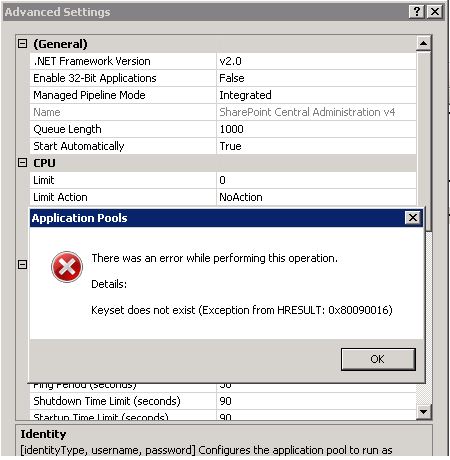
When try to change application pool identity for a sharepoint iis site getting “keyset does not exists” error

One day you noticed that your application pools getting stopped and when try to run again it is stopping again and after a while you suspected that the problem may be caused by identity account corruption and decided that change application pool identity or reset current identity’s password but then upps your getting fallowing error.
“Keyset does not exists (Exception from HRESULT: 0x80090016)

If you get this error first you have to check your MACHINE Keys.By the way i have to say the machine key not only used by IIS or your web sites. So many process can use machine keys to encrypt or decrypt secures like strings,passwords,connection strings etc. As you noticed if some how your machine keys are changed or deleted you may have a big problem if you dont have any proper backup.

but how could that happens ? There is so many possibility here , Malwares,Group Policies,Permission issues, User mistakes , Cleanup programs, misconfigrurations.
So you may first check the fallowing
http://support.microsoft.com/kb/977754

The LOCAL SERVICE account is the service account of the IIS Web Management Service (also known as WMSvc).  This problem occurs because the LOCAL SERVICE account does not have Read access on the iisWasKey key that is located in the following folder: %ALLUSERSPROFILE%\Microsoft\Crypto\RSA\MachineKeys
The following is the file name of the iisWasKey key: 76944fb33636aeddb9590521c2e8815a_GUID
To resolve this problem, follow these steps:

  1. Locate the following folder:
    %ALLUSERSPROFILE%\Microsoft\Crypto\RSA\MachineKeys
  2. Right-click the following file, and then click Properties:
    76944fb33636aeddb9590521c2e8815a_GUID
  3. Click the Security tab, and then click Edit. If you are asked whether you want to continue the operation, click Continue. Then, the list of group names and user names that have access to this key file appears in the Permissions dialog box.
  4. Click Add. Then, the Select Users, Computers, Service Accounts, or Groups dialog box appears.
  5. Type  LOCAL SERVICE, and then click Check Names.
  6. Click OK.
  7. In the Group or user names list, click LOCAL SERVICE. Make sure that the Read check box is checked in the Permissions for LOCAL SERVICE list.
  8. Click OK.

Compare HKEY_LOCAL_MACHINE\SOFTWARE\Microsoft\Cryptography MachineGuid for records in
%ALLUSERSPROFILE%\Microsoft\Crypto\RSA\MachineKeys folder .

So what if you have missing keys:
There is two option.
1) Restore missing keys from newest good backup.
2) I am sorry to say that but second option is Total recovery:
You need to reinstall  SharePoint or IIS even may need all machine. And after do that you must reset all your sharepoint managed accounts’s password.

Machine Keys are important for security and always consider to save them.If you are suspecting that your machine keys stolen you may need to reset your all passwords not for sharepoint all accounts for that machine in use and dont forget machine keys not use only by IIS.

if you think that the issue related a permission issue you may use “Process Monitor” to find out which process can not reach your data.
http://technet.microsoft.com/en-us/sysinternals/bb896645