Sharepoint restrict PeoplePicker filter shows only forms authentication users

If you have a sharepoint site with forms authentication , peoplepicker can able to show both AD user and Forms Authentication Membership user. But sometimes you just want PeoplePicker show only forms authentication users.You can configure sharepoint site for this using stsadm.

syntax:
stsadm -o setproperty -propertyname peoplepicker -nowindowsaccountsfornonwindowsauthenticationmode
-propertyvalue {Yes | No}
[-url] <URL>

The syntax for the getproperty operation is:
stsadm -o getproperty
-propertyname peoplepicker -nowindowsaccountsfornonwindowsauthenticationmode
[-url] <URL>
Note:You can substitute -pn for -propertyname and -pv for -propertyvalue.

Example:

To search from a membership provider only, use the following syntax:

stsadm -o setproperty -url http://<server&gt; -pn “peoplepicker
-nowindowsaccountsfornonwindowsauthenticationmode” -pv yes
Resources:

http://technet.microsoft.com/en-us/library/cc263264(office.12).aspx

about EditModePanel in Sharepoint 2010

In Sharepoint 2010 the EditModePanel has working differently.

One of my friend asked me about a problem with EditModePanel does not render its content instead of PageDisplayMode property  has  already been set to “Display”.This problems only occurs with visitors.(In real who has not have “EditListItems” priviledges)  When i execute the code that he sent me yeah  he is absolutely right. After a couple of minutes in stunned than i used reflector and compared 2007&2010 Microsoft.Office.Sharepoint.Publishing.dll’s. Gotcha !!

Nice and friendly EditModePanel is not as known as it is.  calculateShouldRender() method has been changed

private void calculateShouldRender()

{

if (!ConsoleUtilities.CheckPermissions(SPBasePermissions.EditListItems))

{

this.shouldRender = false;

}

else

{

SPControlMode contextualFormModeFromPostedForm = ConsoleUtilities.GetContextualFormModeFromPostedForm();

if ((SPControlMode.Display == contextualFormModeFromPostedForm) && (PageDisplayMode.Display == this.PageDisplayMode))

{

this.shouldRender = true;

}

else if ((SPControlMode.Edit == contextualFormModeFromPostedForm) && (PageDisplayMode.Edit == this.PageDisplayMode))

{

this.shouldRender = true;

}

else

{

this.shouldRender = false;

}

}

this.Visible = this.shouldRender;

}

if you dont like this extra security code like me you may make your own EditModePanel.

Sharepoint 2010 Convert classic to claim based authentication

You already have a Web application created using Classic Mode Authentication and you want to convert Web application from Classic Mode authentication to Claims based Authentication.

You don’t have to delete that web application. You can convert that web application from classic mode authentication to claims based authentication. However this can only be done using PowerShell and it’s an irreversible process. Follow PowerShell commands to convert the web application from Classic Mode Authentication to Claims based Authentication:

$App = get-spwebapplication “URL”

$app.useclaimsauthentication = “True”

$app.Update()

Example:-

$App = get-spwebapplication “http://webapp:1907”

$app.useclaimsauthentication = “True”

$app.Update()

Warning!: This is an irreversable process.


Compare sql server 2005 and 2008 by SharePoint 2010

You can use both Sql server 2005 and sql server 2008 with sharepoint 2010 but what are the advantages or disadvantages .

Absolutely i recommend use SQL Server 2008 r2 for sharepoint 2010 products. Here is the why i choose it

Performance and Avaiblity :SQL Server 2008 R2 Enterprise edition enables several dimensions on which it can scale, enabling even the most demanding SharePoint Server 2010 deployments. For example, rapidly growing Enterprise Content Management (ECM) or Web Content Management (WCM) workloads may often require compute resources beyond those associated with traditional collaboration scenarios. SQL Server 2008 R2 Enterprise can support this scenario through a number of improvements, by enabling greater processor scale, the ability to address more physical memory on 64-bit hardware, and hot-add hardware support.

Business Continuity Management is a combination of high availability and disaster recovery. High availability ensures a certain absolute degree of operational continuity in the event one or more components fail in an isolated location. Availability requirements are defined by Operating and Service Level Agreements. Disaster recovery ensures a certain absolute degree of operational continuity in the event that all systems fail in one or more locations. Disaster recovery requirements are defined by Operating Level Agreements, Recovery Point, and Recovery Time Objectives.

SQL Server 2008 R2 provides a number of native capabilities to enable the design and deployment of a highly available SharePoint Server 2010 deployment including database mirroring, failover clustering, and log shipping.

SQL Server 2005 mainstream support will end fairly soon (read more athttp://support.microsoft.com/gp/lifesupsps)

Security:
Transparent Data Encryption (TDE) is a feature added in SQL Server 2008 Enterprise that performs real time I/O encryption and decryption of data and log files without requiring unsupported modification of the underlying table schema or increasing the size of the database—that means no changes to SharePoint to enable TDE SQL server audit.Server Audit, which enables tracking and logging events that occur on the system, for example detecting changes or modifications to database objects/stored procedures, surfacing changes to server configuration settings, or detecting changes to audit configuration settings.

Better Reporting Services:SharePoint Server 2010 and SQL Server 2008 R2 Enterprise provide close business intelligence capabilities integration through SQL Server Reporting Services. Using SQL Server Reporting Services, administrators can configure reporting servers to enable real-time access to information and control who has access to that information. End users can benefit from this integration by publishing SQL Server reports directly to Document Libraries or by optionally embedding reports in pages hosted on one or more sites in a Microsoft SharePoint Server 2010 deployment.

To learn more about Reporting Services in SQL Server 2008 see SQL Server Reporting Services (http://msdn.microsoft.com/en-us/library/ms159106.aspx).

Using FileStream Functionality with 2008:Remote Blob Storage integration with SharePoint Server 2010 in SQL Server 2008 R2 Enterprise enables an administrator to externalize SharePoint binary large object (BLOB) data by hosting it on less expensive, commodity hardware solutions and managing it with SQL Server through the same data management techniques they use today. Remote Blob Storage can be an integral component in the most stringent compliance scenarios by enabling third-party technologies to implement solutions such as expunge on the server(s) hosting the externalized BLOBs
see:https://blog.bugrapostaci.com/2010/10/01/sharepoint-2010-server-with-filestream-rbs-provider/


Sharepoint Server 2010 Fuctionality and SQL Server Eddition Comparison

Resources:
http://technet.microsoft.com/en-us/library/cc990273.aspx
http://technet.microsoft.com/en-us/library/cc262749.aspx

Other:

http://sqlcat.com/top10lists/archive/2009/02/24/top-10-performance-and-productivity-reasons-to-use-sql-server-2008-for-your-business-intelligence-solutions.aspx


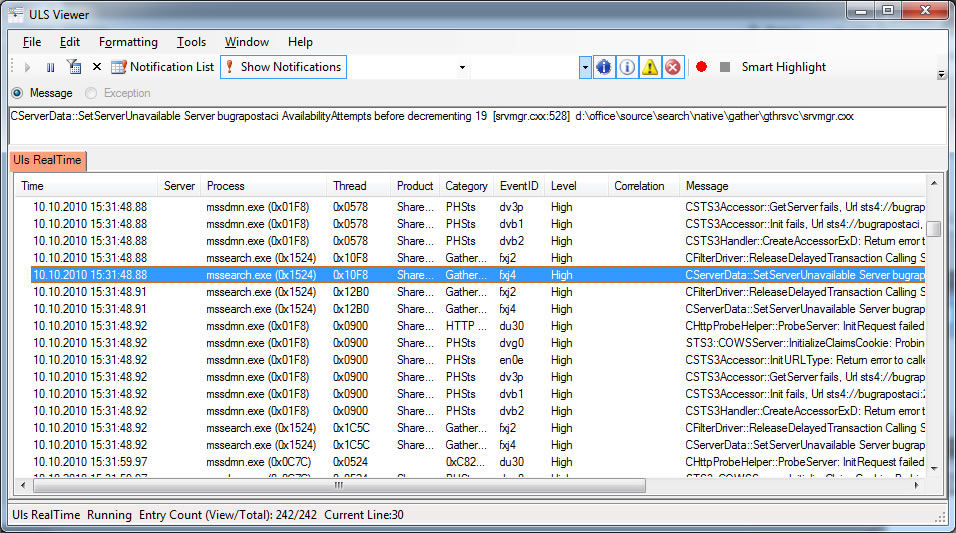
Sharepoint Log management with ULS Viewer

Hi Everybody ,

Sharepoint logs is one of the important point for developers . When an error occures you may want to examine sharepoint logs in drive:\Program Files\Common Files\Microsoft Shared\Web Server Extentions\[12,14]\Logs.These log files are text based and sometimes its make me creazy for searching related data .Because its hard to find some thing in these texts files. There are some tools for easily manage your logs.

What is ULS Viewer:

ULSViewer allows users to open a ULS log file and display its contents in a user friendly format. Users can then perform advanced functions such as filtering, sorting, highlighting, loading logs, appending logs, etc in order to single out the data that is important to the user. This information can be used to diagnose problems with machines running ULS services, or to monitor machines and the events they create in realtime.

Toggle Correlation Tree and Notification features are most i like.In SharePoint 2010 has come with new error handling feature named  “correlation id”  which is help us to trace a series of event inside SharePoint.

Download: http://code.msdn.microsoft.com/ULSViewer/Release/ProjectReleases.aspx?ReleaseId=3308

ULS Viewer for sharepoint: